



Blog

All Fruitland Park GMC Dealer Fruitland Park Buick Dealer About Buick GMC Used Vehicles GMC Trucks GMC Sierra Vehicle Features & Updates Phillips Buick GMC Phillips Buick GMC Service About GMC Buick Enclave Buick Envision Fruitland Park Used Cars GMC Terrain GMC Yukon Buick Encore GX Contests & Giveaways Fruitland Park Buick Service GMC Hummer EV SUVs Buick Envista Discounts GMC Acadia GMC Canyon Phillips Buick GMC Discount Staff Spotlight Trim Colors Vehicle Highlights & Features
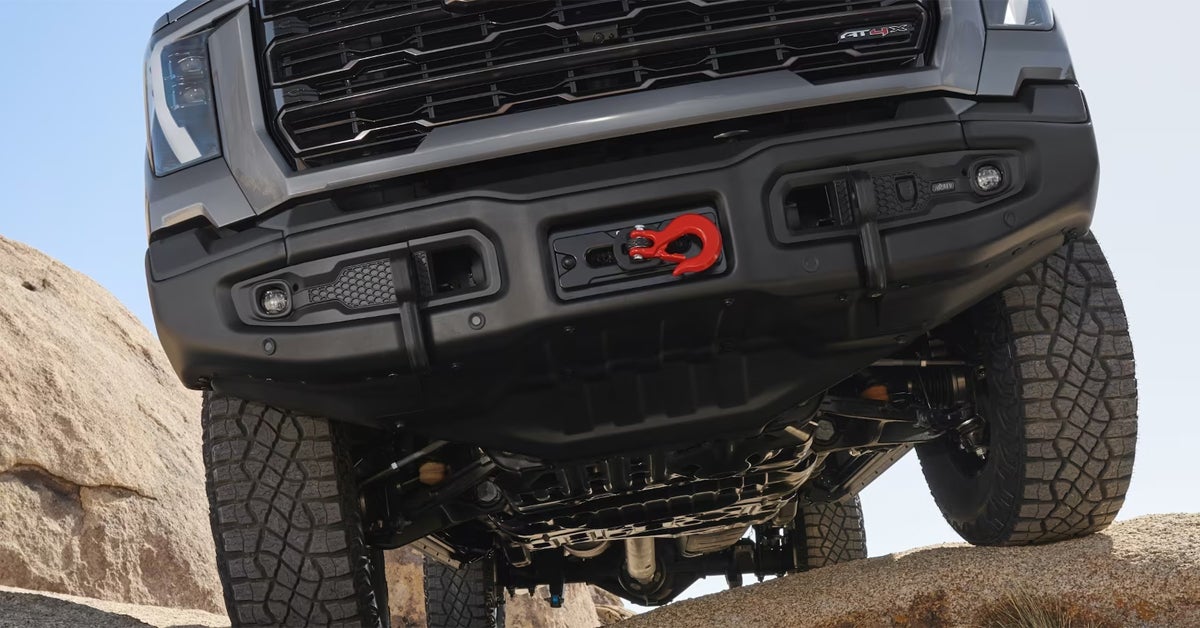
GMC truck undercarriage climbing over rocks and off-roading

Drive Modes in Your GMC: What they Do & When to Use Them

When it comes to driving your GMC, the right drive mode can make all the difference. Whether you’re navigating the bustling streets of Lady Lake, cruising the highways near Leesburg, or tackling off-road trails around Lisbon, understanding how to use your vehicle’s drive modes is key to maximizing its performance and handling. From the powerful Sierra HD to the sleek Acadia and rugged Yukon XL, GMC offers a variety of drive modes that tailor your driving experience to the road ahead. In this guide, we'll break down what each mode does, how to switch between them, and when to choose the best one for your adventure. Ready to learn how to take full control of your drive? Visit or contact Phillips Buick GMC today, and let us help you explore all the exciting ways GMC drive modes can enhance your journey. Service Department Get Directions Contact Us Exploring Available Drive Modes in GMC Vehicles GMC vehicles like the Yukon XL, Sierra HD, and Acadia come with various drive modes designed to enhance your driving experience. These modes adjust your vehicle’s performance to match different road conditions and driving preferences. Whether you're tackling rough terrain, hauling heavy loads, or just cruising down the highway, GMC's drive modes ensure you're always ready for what lies ahead. Here’s a breakdown of the main modes you’ll find in many GMC models: Tour/Normal Mode Ideal for everyday driving, Tour Mode focuses on comfort and fuel efficiency. This mode is perfect for long trips on smooth roads or city commutes. Sport Mode If you're looking for a more dynamic driving experience, Sport Mode tightens steering response and enhances acceleration. This is a great option when you're on dry, twisty roads and want a more engaging ride. Tow/Haul Mode When you need to haul heavy loads, Tow/Haul Mode comes to the rescue. This mode provides more torque, helping with towing or carrying larger loads, making it perfect for the Sierra HD or Yukon XL. AWD Mode If you're driving on wet, snowy, or icy roads, AWD Mode activates the rear wheels, giving you more control over slippery surfaces. This is especially helpful for vehicles like the Acadia when the weather turns unpredictable. Off-Road Mode For those times when you're off the beaten path, Off-Road Mode improves traction and handling on gravel, mud, or sand. It's the perfect setting when exploring rugged terrain or hiking trails in your GMC vehicle. Terrain Mode Available on models equipped with Terrain Selection, this mode is ideal for low-speed, off-road driving. It adjusts the vehicle’s traction control and adds automatic braking to improve performance on uneven or challenging surfaces. Understanding how to use GMC drive modes can make all the difference in your driving experience. Whether you’re navigating the winding roads near Leesburg or towing a boat near Lady Lake, you can easily switch between these modes to match your needs. When to Use Each Driving Mode: A Scenario-Based Guide Knowing when to use each drive mode in your GMC vehicle makes all the difference. Let’s break down some common driving scenarios and the best modes for each, ensuring you get the most out of your Yukon XL, Sierra HD, or Acadia. Everyday Driving (Tour/Normal Mode) Scenario: You're driving on smooth highways or through city streets. When to Use: Select Tour/Normal mode for a smooth ride and better fuel economy. This mode is ideal for daily commutes or long trips on well-maintained roads. Sporty Drives (Sport Mode) Scenario: You’re on a winding road and want quicker response from your vehicle. When to Use: Activate Sport mode to tighten the steering and make the throttle more responsive. This is great for enjoying those fun, twisty drives on dry roads. Towing or Hauling (Tow/Haul Mode) Scenario: You’re pulling a trailer or carrying a heavy load in your Sierra HD or Yukon XL. When to Use: Switch to Tow/Haul mode. It keeps your vehicle in a lower gear, giving you more torque to handle the load smoothly and safely. Wet or Slippery Roads (AWD Mode) Scenario: It’s raining, or there’s snow on the road near Whitney or Leesburg. When to Use: AWD mode helps your vehicle gain traction on wet or icy surfaces. This mode is perfect for improving control when road conditions aren’t ideal. Off-Road Adventures (Off-Road Mode) Scenario: You’re off the main road, maybe on gravel or sand. When to Use: Off-Road mode is built to give you better traction on tough terrain. If you’re exploring paths near Lisbon or Whitney, this mode provides added stability. Low-Speed Off-Roading (Terrain Mode) Scenario: You’re driving slowly over rough terrain, like in the woods or on uneven paths. When to Use: Terrain mode adjusts the vehicle’s traction and shift mapping, making it perfect for mild off-roading. It’s ideal for conditions like mud, ruts, or even pulling a boat out of the water. Bonus: Customizing Your Drive Some GMC vehicles let you personalize your driving experience. With the My Mode setting, you can tweak your suspension, steering, and engine sounds based on your driving style. By selecting the right mode for your situation, you can enhance safety, comfort, and performance. Whether you’re on the highway, towing a trailer, or tackling rough terrain, these modes ensure you're ready for anything. How to Use GMC Drive Modes in Your Vehicle GMC drive modes allow you to adjust your vehicle’s performance for different driving conditions. Whether you’re cruising down the highway or navigating tough terrain, knowing how to use these modes makes your driving experience smoother and safer. Here's a simple guide to get you started. 1. Locate the Drive Mode Selector In most GMC vehicles, the drive mode selector is easy to find. It’s usually located near the gear shift or on the center console. In some models, it may be a button or dial. If you're driving a Sierra HD or Acadia, look for a toggle switch or button with icons representing different modes. 2. Choose Your Desired Mode Once you find the selector, simply turn or press it to choose your mode. Most GMC vehicles come with a few standard options, like: Tour/Normal Mode: Ideal for everyday driving, providing balance between comfort and efficiency. Sport Mode: Makes your vehicle more responsive, perfect for dynamic driving. Tow/Haul Mode: Great for when you're towing heavy loads, like a trailer or boat. Off-Road Mode: Best for rough or uneven terrain, giving your vehicle extra traction. Terrain Mode: Designed for low-speed, off-road adventures where traction is key. 3. Understand Mode Adjustments Each drive mode adjusts key vehicle functions: Throttle Response: Determines how sensitive the accelerator is. Transmission Shifting: Adjusts how quickly or slowly the transmission shifts gears. Suspension System: In off-road and sport modes, the suspension may be stiffer or more flexible, depending on the mode. 4. Switching Between Modes To change modes, simply press or rotate the selector. In vehicles like the Yukon XL, you can switch modes while the vehicle is moving, but be mindful of your speed and road conditions. 5. Using Terrain Selection For more rugged environments, like snow, mud, or sand, select the Terrain Mode. This setting tailors your vehicle’s performance to these specific surfaces, providing better traction and stability. 6. Remember to Use the Right Mode for the Job Drive modes are there to help you. So, always use the mode that fits your current driving needs. For instance, use Tow/Haul mode when towing and switch to Sport mode when you want a bit more excitement on a drive. By understanding how to use GMC drive modes, you can drive smarter and safer. If you're ready to explore your vehicle's full potential, stop by Phillips Buick GMC for a test drive or ask our experts for more information. Tips for Optimizing Drive Mode Use Maximizing the benefits of GMC’s drive modes ensures you get the most out of your vehicle in every situation. By using the right mode at the right time, you can improve both performance and comfort. Here are some easy tips to help you get the most from your drive modes. 1. Know When to Switch Modes Different driving conditions call for different modes. Switching when needed can improve your vehicle’s handling and efficiency. Highway Driving: Use Tour/Normal Mode for smooth, fuel-efficient driving. Towing or Hauling: Switch to Tow/Haul Mode to improve power delivery and reduce strain on the engine. Off-Road Adventures: Off-Road Mode and Terrain Mode are ideal when you're tackling rough terrain or uneven roads. 2. Use Sport Mode for an Extra Boost If you're craving more responsive handling or a quicker acceleration, switch to Sport Mode. This mode sharpens throttle response and adjusts transmission shifts for a more dynamic driving experience. It's perfect for city driving or when you're looking to enjoy a spirited drive. 3. Switch to Terrain Mode for Better Traction When driving on slippery surfaces like snow, sand, or mud, Terrain Mode gives you the traction you need. It adjusts your vehicle’s settings for low-speed stability, ensuring you don’t get stuck in tough spots. 4. Monitor Your Driving Conditions Keep an eye on the weather and road conditions. In situations like wet roads or snowy conditions, switching to the right mode can help you maintain control. It’s especially helpful in vehicles like the Yukon XL or Sierra HD, where the added power may need adjustment for smoother handling. 5. Don’t Forget About Fuel Efficiency While more aggressive modes like Sport Mode can be fun, they can also consume more fuel. If you're on a long road trip or just cruising, Tour Mode will keep you in a more fuel-efficient setting. 6. Understand Your Vehicle’s Limits Each vehicle may have different capabilities. For example, Acadia and Sierra HD models come with unique settings. Always be aware of what your vehicle can handle in each mode, especially when towing or driving off-road. By switching between modes based on your driving needs, you can make your ride more comfortable and safer. Experiment with your vehicle’s modes to find what works best for you. For more tips on how to use GMC drive modes effectively, visit Phillips Buick GMC, and let us help you get the most out of your vehicle! What to Expect When Driving in Each Mode Each drive mode in your GMC vehicle is designed to optimize your driving experience based on different road conditions. Here's what you can expect when driving in each mode, and how it can benefit your journey. 1. Tour/Normal Mode When to Use: Everyday driving, highway trips, or light city commutes. What to Expect: Smooth handling and comfort. Fuel-efficient performance, ideal for long drives. A more relaxed ride with balanced power distribution. Responsive steering, but not overly aggressive. Best For: Easy, stress-free driving, especially during long commutes or on highways. 2. Sport Mode When to Use: When you want a more dynamic driving experience, like spirited city driving or a fun weekend cruise. What to Expect: Sharper throttle response. More immediate acceleration. Slightly stiffer suspension for better cornering. Increased engine revs, giving you more power on demand. Best For: Drivers who crave responsiveness and faster acceleration, making it perfect for quick maneuvers. 3. Tow/Haul Mode When to Use: When towing or hauling heavy loads, such as a trailer, boat, or large equipment. What to Expect: Enhanced engine braking for smoother deceleration. Adjusted gear shifting to provide more power for heavy loads. Increased stability on steep inclines or declines. Reduced strain on the engine and transmission when hauling. Best For: Towing large loads, especially when navigating hills or needing extra torque. 4. Off-Road Mode When to Use: When driving on rough, uneven, or unpaved roads, like trails or gravel paths. What to Expect: Adjusted throttle and traction control for better grip on loose surfaces. More controlled power delivery to help you navigate tough terrain. Improved stability on rocky, muddy, or sandy surfaces. Less risk of getting stuck in deep mud or sand. Best For: Adventurous drives, off-road trips, or when you need extra traction. 5. Terrain Mode When to Use: For low-speed off-road driving on rough terrain, like snow, sand, or deep mud. What to Expect: Maximum traction to handle tough surfaces. Adjusts your vehicle’s systems to improve low-speed stability. Easier control when navigating difficult terrain without risking slipping or bogging down. Best For: More extreme off-roading, like sand dunes, snow-covered paths, or rough dirt trails. 6. Snow Mode When to Use: On icy or snowy roads during winter months. What to Expect: More gradual throttle response to prevent wheel spin. Adjusted traction control to maximize grip in slippery conditions. Smoother, more controlled driving to reduce sliding. Best For: Winter conditions, including icy roads, snow-covered streets, or wet conditions. By understanding each mode’s features, you can select the right one based on your driving needs. Whether you're cruising in a Yukon XL, tackling tough roads in a Sierra HD, or navigating everyday streets in an Acadia, the right drive mode helps improve both comfort and control. For more detailed advice on using these modes in your GMC, come visit us at Phillips Buick GMC. We're happy to show you how to optimize your drive! Which drive modes are standard on most GMC models? Most GMC models, including the Yukon XL, Sierra HD, and Acadia, typically come with Tour/Normal, Sport, and Tow/Haul modes as standard. Some models may also offer additional options like Off-Road, Terrain, or Snow modes, depending on the vehicle's specific configuration. Do I have to manually switch between modes or does the truck auto-adjust? You generally need to manually switch between modes on most GMC vehicles. However, in some models, the vehicle may auto-adjust certain systems (like traction control) in response to road conditions, but for full mode changes, driver input is typically required. Are there any limitations for using specific drive modes in certain conditions? Yes, each drive mode is designed for specific conditions. For example, Sport Mode is not recommended for slippery roads, while Off-Road Mode should only be used on rough terrain. Tow/Haul Mode should be used when towing or hauling heavy loads. It’s important to choose the appropriate mode for your environment to avoid strain on the vehicle and ensure safety. Find Your Next GMC at Phillips Buick GMC Now that you’ve learned more about how GMC drive modes work, you may be wondering how these features fit into your ideal vehicle. Whether you're considering the Yukon XL, Sierra HD, or Acadia, we have a wide selection of vehicles ready for you to explore. Our team at Phillips Buick GMC is here to help guide you through the choices and answer any questions you may have. We invite residents from Lady Lake, Whitney, Leesburg, and Lisbon to stop by and discover all that we offer. Our knowledgeable staff is eager to help you find the right GMC vehicle that fits your needs and lifestyle. From advanced drive modes to towing capabilities, we’re here to help you make an informed decision. Want to know more about how GMC trucks perform with diesel engines? Or perhaps you're interested in understanding auto body and collision repair in Fruitland Park? If you're wondering whether any mechanic can work on a diesel truck, we've got the answers for you. You can find additional insights on our website, so don’t hesitate to reach out and explore our inventory here: Phillips Buick GMC New Vehicle Inventory. Visit us today and see how we can make your next driving experience better! Get Directions to Phillips Buick GMC Disclaimer: All information is provided for general informational and entertainment purposes only. While we strive for accuracy, we cannot guarantee that all content is complete, current, or error-free. Any reliance you place on such information is strictly at your own risk. This article may include opinions and is not endorsed by, or officially affiliated with, any vehicle manufacturer or brand. Always consult official sources – such as the vehicle’s owner’s manual, authorized dealerships, or certified professionals – for the most up-to-date and personalized information.

GMC Hummer EV Interior steering wheel and dashboard

What is "L" Mode On Your GMC?

When you're driving your GMC Sierra 1500, Sierra HD, or Canyon, you might notice a mysterious "L" mode on your gear shift and wonder what it’s all about. In simple terms, "L" stands for low gear, and it’s a powerful tool that can make all the difference in certain driving conditions. Whether you're towing heavy loads, tackling steep hills, or navigating through slippery terrain, this setting provides the torque and control you need to get the job done safely and efficiently. But what exactly does it do, and when should you use it? Let’s break it down. If you're curious about how "L" mode can enhance your driving experience or if you want to explore the perfect GMC for your needs, feel free to visit Phillips Buick GMC today! Service Deparment Get Directions Contact Us How "L" Mode Affects Your GMC’s Performance When you shift your GMC into "L" mode, you’re engaging the vehicle’s low gear. This setting adjusts your truck’s performance, giving you more control and power when driving in specific situations. Here’s how it affects your truck: Increased Torque: When you’re in low gear, the engine delivers more torque. This is perfect when you need extra power, like when towing heavy loads or driving uphill. Improved Control on Steep Terrain: Low gear helps you maintain a steady speed when going up or down steep hills. It keeps your engine from overworking and prevents sudden changes in speed. Slower Speed for Better Handling: The low gear slows your truck down, allowing for better handling, especially when navigating tough or slippery roads. This gives you more control, reducing the risk of skidding or losing traction. Efficient Engine Braking: When you’re coming down a steep incline, "L" mode helps by using engine braking. This keeps your brakes from overheating and reduces the need to rely solely on them. GMC Transmission Modes and Their Purpose In addition to "L" mode, your GMC’s transmission has other settings that impact performance. These modes allow you to adapt to different driving conditions: Normal Mode: The default setting for everyday driving. The vehicle shifts gears automatically, offering a balance of performance and fuel efficiency. Tow/Haul Mode: A setting designed to optimize power for towing heavy loads. It helps with engine braking and reduces gear shifting for a smoother ride when hauling. Off-Road Mode: A setting found in certain GMC models like the Sierra 1500 or Canyon. It adjusts the suspension and drivetrain to provide better traction on rough terrain. By understanding how these transmission modes work together, you can better control your driving experience, whether you're cruising down the highway or navigating rough paths. When Should You Engage "L" Mode on Your GMC? Engaging "L" mode on your GMC is helpful in specific driving situations. Using it at the right time can improve your truck’s performance and safety. Here are the key times when you should switch to "L" mode: Towing Heavy Loads: If you're towing something heavy, "L" mode can give your engine the extra power it needs. The low gear helps you maintain control while towing, making it safer and easier to drive. Driving Uphill: When driving up steep hills, engaging "L" mode provides more torque. This helps you maintain a steady pace without overloading your engine. Descending Steep Grades: "L" mode helps with engine braking when going downhill. It reduces your reliance on the brakes, helping prevent them from overheating. Off-Road Conditions: If you're driving on rough or slippery terrain, "L" mode can help with traction and control. It allows your truck to better handle uneven surfaces. Heavy Loads in the Bed or on the Truck: When carrying heavy items in the bed or truck, "L" mode helps keep your truck steady. It ensures that the added weight doesn’t affect your control or speed. By using "L" mode in these situations, you can get the most out of your GMC’s performance. Whether you're driving a Sierra HD or Canyon, understanding when to engage low gear can make a big difference in your driving experience. The Benefits of "L" Gear in Special Driving Conditions Engaging "L" gear, or low gear, can significantly improve your driving experience in tough conditions. Whether you're in a Sierra 1500, Sierra HD, or Canyon, using low gear offers several benefits. 1. Better Control on Steep Hills Low gear helps maintain control when driving up or down steep inclines. It prevents the engine from overworking, allowing you to focus on steering. 2. Improved Traction in Off-Road Conditions When driving on dirt roads, mud, or snow, low gear helps your truck maintain traction. It makes it easier to navigate slippery or uneven terrain without losing control. 3. Reduced Braking Needs When Descending Low gear helps with engine braking when going downhill. It reduces the strain on your brake pads, keeping them from overheating on long descents. 4. More Power for Towing Heavy Loads Engaging low gear provides extra torque when towing. This ensures that your truck can handle heavy loads without straining the engine or transmission. By engaging low gear in these special conditions, you make sure your GMC operates at its best. Whether you're climbing hills, towing, or navigating tricky terrains, "L" mode ensures your vehicle performs efficiently and safely. Tips for Maximizing the Use of "L" Mode in Your GMC When driving in special conditions, knowing how to use "L" mode effectively can make a big difference. Here are some helpful tips to get the most out of low gear in your GMC. 1. Switch to "L" Mode When Climbing Steep Hills When going uphill, engage low gear to give your engine extra power. This helps prevent your truck from slowing down or stalling. 2. Use "L" Mode for Towing Heavy Loads When towing, low gear provides more torque to handle the extra weight. This makes it easier to pull trailers or heavy loads without stressing the engine. 3. Engage Low Gear for Off-Road Driving On rough terrain, low gear gives you better control and stability. It helps prevent wheel spin, especially on slippery or uneven surfaces. 4. Turn on "L" Mode When Going Downhill Low gear allows engine braking, reducing the need for excessive braking. This helps maintain control on long descents and prevents brake overheating. 5. Don’t Use "L" Mode on Flat Roads Using low gear on level ground can reduce fuel efficiency. It’s best to switch back to standard transmission modes when driving on flat roads. By using "L" mode at the right times, you ensure your GMC handles tough situations with ease and keeps performing at its best. Whether you're tackling hills, towing, or navigating off-road paths, low gear can make your drive smoother and safer. What to Avoid When Using "L" Gear on Your GMC While "L" mode can be helpful in specific driving conditions, it’s important to avoid using it in certain situations to protect your vehicle. Here’s what to keep in mind: 1. Avoid Using "L" Mode on Highways or Fast Roads Low gear is designed for low-speed, high-torque situations. Using it on highways can limit your speed and reduce fuel efficiency. 2. Don’t Leave "L" Mode Engaged for Extended Periods Driving in low gear for too long can strain the engine. It may cause unnecessary wear on the transmission if not used appropriately. 3. Avoid Engaging "L" Mode When Towing Light Loads Low gear is most useful for heavy loads or steep terrain. Using it for light towing can cause unnecessary fuel consumption and wear. 4. Don’t Use "L" Mode in Dry Conditions on Flat Roads It’s best to reserve low gear for challenging terrains or inclines. On flat, dry roads, it can lower your vehicle’s performance and fuel economy. 5. Avoid Sudden Speed Changes in Low Gear Shifting in and out of low gear too quickly can harm your vehicle. Gradually accelerate or decelerate when using "L" mode to avoid unnecessary stress on the transmission. By understanding when not to use "L" mode, you can avoid damaging your vehicle and ensure it performs at its best for the tasks that matter most. Keep these tips in mind to maintain your GMC’s longevity and efficiency. Does “L” mode offer any advantages for towing or hauling? Yes, "L" mode can be beneficial for towing and hauling. It provides more torque and engine braking, which helps you maintain control of your vehicle, especially on steep grades or while carrying heavy loads. Can I switch to “L” mode while driving at higher speeds? It’s generally not recommended to switch to "L" mode while driving at higher speeds, as it can cause excessive engine revving and strain on the transmission. It’s best to engage "L" mode at lower speeds, particularly in situations like towing or driving on steep inclines. How does “L” mode differ from standard Drive modes? "L" mode, or low gear, is designed for low-speed, high-torque driving situations. It helps with engine braking and provides better control when driving on steep grades or towing heavy loads. In contrast, standard Drive modes are intended for everyday driving and provide a balance of power and fuel efficiency. Find the Ultimate GMC Vehicle at Phillips Buick GMC Now that you have a better understanding of how "L" mode works in your GMC, you're likely curious about how it fits into your overall driving experience. Whether you're considering using "L" mode for towing, hauling, or navigating tough terrain, knowing the ins and outs of your vehicle’s transmission can make all the difference. If you’re from Lady Lake, Whitney, Leesburg, or Lisbon, we invite you to explore our wide selection of GMC vehicles, including the Sierra 1500, Sierra HD, and Canyon. These powerful models are ready to take on any challenge, whether you're towing a heavy load or tackling difficult roads. Looking for more tips on keeping your GMC in top shape? Check out our guide on replacing spark plugs, or find out what to do when your odometer hits 100K miles. You can also find helpful advice on what to bring when test-driving a car. Ready to find your next vehicle? Explore our new inventory and see all the options we have available. Get Directions to Phillips Buick GMC Disclaimer: All information is provided for general informational and entertainment purposes only. While we strive for accuracy, we cannot guarantee that all content is complete, current, or error-free. Any reliance you place on such information is strictly at your own risk. This article may include opinions and is not endorsed by, or officially affiliated with, any vehicle manufacturer or brand. Always consult official sources – such as the vehicle’s owner’s manual, authorized dealerships, or certified professionals – for the most up-to-date and personalized information.
Man replacing the sparkplugs in an engine

Replacing Spark Plugs in Your Buick: Your Step-By-Step Guide [2025]

When it comes to keeping your Buick running smoothly, one often-overlooked but essential task is replacing the spark plugs. These tiny components are crucial to engine performance, ignition efficiency, and fuel economy. But how do you know when it's time to swap them out? And more importantly, how do you do it? In this step-by-step guide, we’ll break down the process of replacing spark plugs in your Buick, so you can keep your ride purring like new. Whether you're a seasoned DIYer or just starting out, this guide will help you make the job a breeze. Of course, if you're more comfortable leaving the work to the professionals, Phillips Buick GMC is always here to help. Stop by or give us a call — our expert team is ready to ensure your Buick stays in peak condition! Service Department Get Directions Contact Us When to Replace Spark Plugs: Key Indicators and Manufacturer Guidelines Spark plugs are vital for your Buick's engine. Over time, they wear out and need replacing to keep your vehicle running smoothly. Knowing when to replace your spark plugs can save you from poor engine performance and higher repair costs. Here are the signs to look for and the manufacturer’s recommendations: Key Indicators You Need to Replace Your Spark Plugs: Poor Fuel Efficiency: If your Buick’s gas mileage has dropped, worn spark plugs could be the culprit. Engine Misfires: A misfiring engine may indicate a spark plug is no longer igniting properly. Rough Idling: If your Buick idles rough or stalls, it’s time for a Buick spark plug replacement. Difficulty Starting: Struggling to start your vehicle can be a sign that the spark plugs are worn out. Illuminated Check Engine Light: A flashing check engine light could point to a spark plug issue, particularly if the engine misfires. Manufacturer Guidelines for Spark Plug Replacement Buick recommends replacing spark plugs at specific intervals for optimal performance. The timing may vary based on the model and year of your vehicle. For instance, vehicles like the Buick Encore GX, Envision, and Envista typically require spark plug replacements every 60,000 miles. However, always check your owner’s manual for the most accurate recommendations for your specific vehicle. General Spark Plug Replacement Schedule: Every 60,000 miles: Standard recommendation for many Buick models. Every 100,000 miles: Some newer models may have spark plugs designed for longer intervals. Paying attention to these guidelines and indicators can help you know when to perform a Buick tune up and avoid major engine issues. If you notice any of these signs or just want to be proactive, don’t hesitate to contact Phillips Buick GMC for expert service and advice. Our team can guide you on the best time to replace your spark plugs and ensure your Buick stays in top shape. Gathering the Right Tools for Buick Spark Plug Replacement Before you begin replacing your spark plugs, it’s important to gather all the necessary tools. Having everything on hand will make the process smoother and ensure that you do the job right. Here’s what you’ll need for a successful Buick spark plug replacement: Essential Tools for Spark Plug Replacement: Socket Wrench: A socket wrench with the correct size socket is essential for removing the spark plugs. Spark Plug Socket: This is a special socket designed to grip the spark plug, making it easier to remove and install. Torque Wrench: It’s crucial to tighten the spark plugs to the manufacturer’s recommended torque specification. Extension Bar: An extension bar can help you reach spark plugs in hard-to-reach spots, especially in tight engine spaces. Spark Plug Gap Tool: Use this tool to check and adjust the gap between the spark plug electrodes before installation. Anti-Seize Lubricant: This helps ensure that the spark plugs can be removed easily in the future and prevents them from getting stuck. Rubber Gloves: Protect your hands from grease, grime, and dirt as you work on your vehicle. Socket Set: For various bolts or components that may need to be removed to access the spark plugs. Bonus Tools (Optional): Compressed Air: Helps blow away debris and dirt around the spark plug area. Magnetic Pickup Tool: Useful if a spark plug or part drops into the engine bay. When gathering your tools, make sure to refer to your Buick’s owner’s manual for any specific requirements related to the model you’re working on, like the Encore GX, Envision, or Envista. Each Buick model may have slight variations in spark plug location and required tools. Having these tools ready will help ensure your Buick tune up goes off without a hitch. If you’re unsure or don’t want to tackle the replacement yourself, feel free to visit Phillips Buick GMC for professional assistance. We can help with everything from spark plug replacement to complete tune-ups for your vehicle. Locating and Accessing the Spark Plugs in Your Buick Now that you have your tools ready, the next step is to find and access the spark plugs. In most Buick models, including the Encore GX, Envision, and Envista, the spark plugs are located under the hood, usually near the engine block. Here’s a step-by-step guide to help you locate and access them. Steps to Locate the Spark Plugs: Open the Hood Start by securing the vehicle and opening the hood. Make sure the engine is cool before you start working. Locate the Ignition Coils Spark plugs are typically located beneath the ignition coils. The ignition coils are often mounted on top of each spark plug. You’ll usually see wires or connectors leading to them. Identify the Number of Spark Plugs Depending on the engine, there may be 4, 6, or 8 spark plugs. For example, the 4-cylinder engines in the Buick Envision and Encore GX usually have four spark plugs. Remove the Engine Cover (if needed) Some Buicks may have an engine cover that partially blocks access to the spark plugs. If so, carefully remove the cover by unscrewing any bolts or clips that hold it in place. Disconnect the Ignition Coils Before removing the spark plugs, you’ll need to disconnect the ignition coils. Use your socket wrench to remove the bolts holding the coil in place. Carefully lift the coil off the spark plug. Check for Obstructions In some cases, there may be hoses or other components in the way. If so, gently move them aside to give yourself more space to work. Helpful Tips: Be careful when removing the ignition coils or other components. Forcing anything can cause damage to delicate parts. If you’re having trouble locating the spark plugs, refer to your owner’s manual for a diagram specific to your Buick model. Once you've located the spark plugs, you're ready for the next step in the Buick spark plug replacement process. Need help? Our team at Phillips Buick GMC can assist with everything from locating the spark plugs to performing a complete Buick tune-up. Removing Old Spark Plugs: A Precise Process for Optimal Results Once you’ve accessed the spark plugs in your Buick, the next step is to remove the old spark plugs. This process requires care and precision to ensure your Buick spark plug replacement goes smoothly. Here’s how to do it: Step-by-Step Guide to Remove Spark Plugs: Double-Check Your Tools Ensure you have a spark plug socket, an extension bar, and a ratchet wrench ready. These tools will give you the reach and grip needed to remove the spark plugs. Loosen the Spark Plugs Attach the spark plug socket to the ratchet wrench and place it over the first spark plug. Gently turn the wrench counterclockwise. It should loosen with minimal effort. If it’s stuck, apply some penetrating oil and let it sit for a few minutes. Remove the Spark Plug Once the spark plug is loose, continue turning until you can remove it completely by hand. Be sure to keep the spark plug socket firmly in place to avoid damaging the threads in the cylinder head. Inspect the Spark Plug As you remove the old spark plug, take a moment to inspect it. Look for signs of wear or damage, such as heavy carbon buildup, cracks, or corrosion. This can help you determine if other issues need attention during your Buick tune-up. Repeat the Process for All Spark Plugs Continue this process for each spark plug. If you're working on a Buick model like the Envision or Encore GX, you’ll likely have four or more plugs to remove. Tips for Removal: Use a steady hand: Keep the ratchet wrench steady and avoid jerking it too hard. This will prevent the plug from being damaged. Mark the plugs: You can label each spark plug to remember which one came from which cylinder. This can help when you install the new plugs. Once all the old spark plugs are removed, you're ready to move on to the next step: installing the new ones. Need assistance or prefer to have it done for you? Phillips Buick GMC is here for all your Buick spark plug replacement needs. Inspecting and Preparing New Spark Plugs for Installation Before installing your new spark plugs, it’s essential to inspect and prepare them properly. This ensures they fit correctly and work efficiently in your Buick. Here’s how to get them ready: Step-by-Step Guide for Preparing New Spark Plugs: Check the Spark Plug Gap Spark plugs have a small gap between the electrodes, which needs to be precise for optimal performance. Use a spark plug gap tool to check the gap size. Compare it to the manufacturer’s recommended gap for your Buick. If the gap is too wide or too narrow, adjust it gently using the tool. Be careful not to apply too much force, as the electrodes are fragile. Inspect the New Spark Plug Before installation, carefully inspect each spark plug for any defects. Look for: Damaged threads: Make sure the threads are clean and undamaged. Clean insulator: Ensure the insulator (the ceramic part) is free from cracks or chips. Electrode condition: The electrode should be intact and not worn down. Apply Anti-Seize Lubricant (Optional) Some car owners apply anti-seize lubricant to the threads of the spark plugs. This helps prevent the plugs from sticking in the engine when it’s time for the next replacement. However, check your vehicle's manual before using this, as not all manufacturers recommend it. Double-Check the Part Number Make sure the new spark plugs are the correct ones for your vehicle. Using the wrong spark plug could cause poor engine performance. If you’re unsure, always consult your Buick's manual or ask a professional at Phillips Buick GMC for guidance. Prepare for Installation Once everything checks out, you’re ready to install the spark plugs. Gently handle the new plugs to avoid damage. Key Tips: Be gentle: The spark plug’s ceramic part is delicate. Handle each one carefully. Use the right tool: A spark plug gap tool and a socket wrench will help make the job easier and more precise. Once your new spark plugs are prepared, you’re all set to move on to the next step of installation. If you’re not comfortable doing it yourself, Phillips Buick GMC is always ready to assist with Buick spark plug replacement or a full Buick tune-up for your Encore GX, Envision, or Envista. Common Questions About Replacing spark plugs in Your Buick How often should I change spark plugs in a 2025 Buick? Spark plugs in a 2025 Buick should be replaced approximately every 60,000 to 100,000 miles, depending on the model and driving conditions. What specific tools do I need to replace Buick spark plugs? To replace Buick spark plugs, you’ll need a spark plug socket, socket wrench, extension bar, spark plug gap tool, and a torque wrench to ensure proper installation. Should I check or replace other engine components while changing spark plugs? Yes, it’s a good idea to inspect or replace other components such as ignition wires, coils, and the air filter when replacing spark plugs to ensure your engine runs smoothly. Get Expert Buick Service at Phillips Buick GMC Replacing spark plugs is an important step in maintaining your Buick’s engine. If you need more guidance or want professional help, Phillips Buick GMC is here to assist you. Our team can provide expert advice on Buick tune-ups, spark plug replacement, and much more. For drivers in Lady Lake, Whitney, Leesburg, and Lisbon, we invite you to explore our wide selection of vehicles. Whether you’re looking for a new Buick Encore GX, Envision, or Envista, we have options that fit your needs and style. Visit us to find your next ride and enjoy a smooth, hassle-free experience. While you're here, be sure to check out our helpful resources. Learn more about common vehicle issues like why your car may be pulling to the side, what should your GMC's tire pressure be or find solutions to why your GMC won’t start. Explore our full inventory and start your journey today by visiting our new vehicle selection. Our team at Phillips Buick GMC is ready to help you with all your vehicle needs! Get Directions to Phillips Buick GMC Disclaimer: All information is provided for general informational and entertainment purposes only. While we strive for accuracy, we cannot guarantee that all content is complete, current, or error-free. Any reliance you place on such information is strictly at your own risk. This article may include opinions and is not endorsed by, or officially affiliated with, any vehicle manufacturer or brand. Always consult official sources – such as the vehicle’s owner’s manual, authorized dealerships, or certified professionals – for the most up-to-date and personalized information.
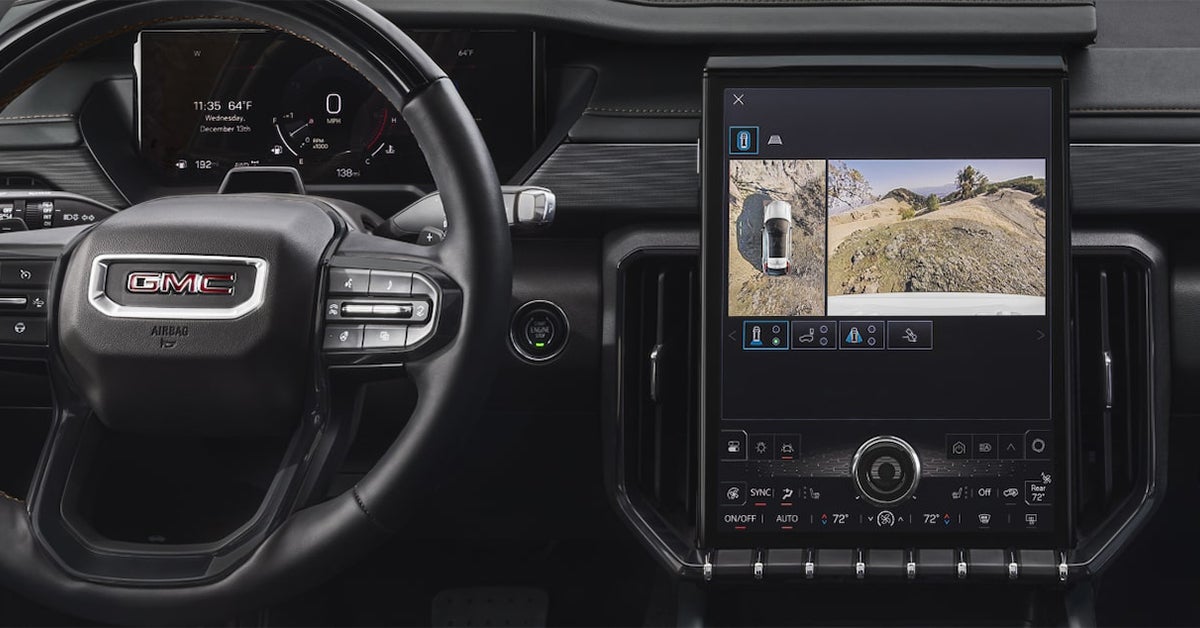
2025 GMC Acadia exterior camera system on center display

How to Use 360 Degree Cameras for Off-Roading in Your GMC

When you're off-roading, the last thing you want is to be caught off guard by a hidden obstacle or uneven terrain. That's where GMC's innovative 360-degree camera system comes in, offering you a comprehensive view of your surroundings to navigate even the most rugged trails with confidence. Whether you're tackling rocky paths or exploring backcountry roads, knowing how to properly use this high-tech feature can make all the difference in your off-road adventures. In this guide, we'll walk you through how to maximize the power of your GMC's 360-degree cameras, ensuring you're always prepared for the road less traveled. Ready to get behind the wheel of your next adventure? Visit or contact Phillips Buick GMC today, and let us help you find the perfect GMC vehicle equipped for any terrain! Service Department Get Directions Contact Us What Is a GMC 360 Camera and How Does It Work? The GMC 360 Camera is an advanced feature designed to enhance your driving experience, especially when you’re off-road. It provides a bird’s-eye view of your vehicle’s surroundings, making it easier to spot obstacles and navigate tight spaces. Whether you're in a Sierra 1500, Sierra HD, or Canyon, the GMC surround camera system helps you tackle tough terrain with confidence. Here’s how it works: Multiple Cameras: The system uses cameras mounted around your vehicle to capture views from all sides. 360-Degree View: These cameras create a real-time, overhead view of your surroundings, displayed on your screen. Off-Road Readiness: When driving off-road, this view helps you spot rocks, ditches, and other hazards that could be hidden from your regular view. Key Benefits of the GMC 360 Camera: Increased Awareness: Get a complete view of the area around your vehicle to help avoid obstacles. Better Navigation: Perfect for off-roading, the 360 cameras help guide you through tight spots and uneven ground. Confidence on Any Terrain: Whether you're in a Sierra 1500 or Canyon, this system allows you to focus on your adventure instead of worrying about hidden dangers. With this technology, the GMC surround camera makes it easier to enjoy your off-road experience, whether you're exploring rocky paths or heading down rugged trails. It's all about giving you more control, safety, and ease on every journey. The Benefits of Using a 360 Degree Camera for Off-Roading When you're off-roading, every obstacle matters. A GMC 360 Camera gives you a complete view of what's around your vehicle. This feature is a game-changer for drivers of the Sierra 1500, Sierra HD, and Canyon. It makes off-roading safer and easier by giving you more awareness of your surroundings. Key Benefits of Off-Roading with 360 Cameras: Enhanced Safety: The 360-degree view helps you avoid hidden rocks, trees, or uneven terrain that may be hard to spot otherwise. Clearer Visibility: With cameras placed around your vehicle, the GMC surround camera ensures you can see everything, no matter how rough the terrain. Improved Confidence: Whether you're navigating a steep hill or crawling over rocks, the real-time view makes you feel more in control. Easier Maneuvering: Tight spaces, like narrow trails or crowded parking lots, become less of a challenge when you can see all angles of your vehicle. Better Precision: When you're off-road, every inch counts. A 360 camera lets you position your vehicle with precision, avoiding potential hazards. With these benefits, driving off-road becomes less stressful and more enjoyable. The GMC 360 Camera takes the guesswork out of the equation and helps you focus on the adventure. Using the GMC 360 Camera to Navigate Tight Trails and Rough Terrain Off-roading can take you to some tricky spots. Narrow trails, rocky paths, and steep inclines are part of the adventure. With the GMC 360 Camera, navigating these challenges becomes much easier. The camera gives you a full view of what's around your vehicle, helping you avoid obstacles and find the best route. How the GMC 360 Camera Helps on Tight Trails and Rough Terrain: 360-Degree View: See all sides of your vehicle. This is perfect when driving through tight spaces where you can’t see everything clearly. Avoid Hidden Obstacles: Rocks, trees, or ditches that are hard to spot with the naked eye become visible through the camera’s lens. Precise Maneuvering: Navigate tricky terrain with confidence. The camera shows exactly where your wheels are, so you can move carefully over rough ground. Real-Time Feedback: Get a live view of your surroundings, which is especially helpful when climbing over rocks or turning sharply on tight trails. Clearer Parking: If the trail leads to a narrow spot, the GMC surround camera lets you back up or park with ease. Whether you’re in a Sierra 1500, Sierra HD, or Canyon, the 360 camera helps you master even the most difficult trails. With this technology, off-roading becomes safer and more enjoyable. Integrating Off-Road Driving Modes with 360 Camera Views in Your GMC When you're off-roading, every turn and obstacle counts. That's why integrating off-road driving modes with the GMC 360 camera is a game changer. It enhances your driving experience by combining vehicle settings with real-time visual feedback. In GMC trucks like the Sierra 1500, Sierra HD, and Canyon, the 360 camera works seamlessly with off-road driving modes to help you tackle rough terrain with confidence. How Off-Road Modes and 360 Camera Work Together: When you engage off-road driving modes, such as Terrain Mode or Hill Descent Control, the vehicle adapts to the specific challenges of the terrain. These modes adjust settings like suspension, traction, and throttle response. Meanwhile, the GMC surround camera system provides a live feed from multiple angles around your truck. Adaptive Terrain Response: As you switch between driving modes, the GMC 360 camera offers you different perspectives. This is useful when navigating steep hills, muddy trails, or rocky paths. Real-Time Visibility: With 360 cameras, you can see every angle, even when you can’t physically turn your head or glance out the window. This is especially valuable when driving on narrow or rocky paths. Better Control: By combining off-road modes with the camera's live views, you can monitor your vehicle's position in relation to obstacles. For instance, you can tell if you're heading straight into a rock or if you need to adjust your angle. Hill Descent and Climbing: When using features like Hill Descent Control, the camera provides a clear view of the terrain below. It’s easier to assess if there’s enough clearance or if you need to adjust your path. This integration takes away the guesswork, allowing you to focus on the fun part: the drive. Whether you're navigating narrow trails in a Canyon or climbing over rocks in a Sierra HD, the 360 camera gives you peace of mind. Thanks to this seamless pairing of technology, off-roading becomes a safer, more precise experience. You’ll feel in control no matter how rugged the trail gets. Visit us at Phillips Buick GMC to see how the 360 camera can transform your off-road adventures. How to Adjust Your GMC Surround Camera for Optimal Off-Roading Views When you're out off-roading, the GMC 360 camera and GMC surround camera work together to provide the visibility you need. Adjusting your camera settings can make navigating tough trails and rocky terrain a lot easier. Here’s how to ensure you get the best off-road views. Step-by-Step Guide to Adjusting Your Camera: Activate the 360 Camera First, make sure the camera system is turned on. You can activate the GMC surround camera through the touch screen in your vehicle. This will give you a bird's-eye view of the area around you. Select the Right Camera Angle The 360 camera gives multiple views: front, rear, side, and overhead. For off-roading, choose the front view to spot obstacles ahead. You may also want to use the side view to check the area beside your tires for rocks or branches. Switch to Off-Road Mode Many vehicles, like the Sierra 1500 or Canyon, offer off-road driving modes that adjust the camera for better performance on rough terrain. This mode typically gives you more detailed views, enhancing your visibility when driving through dirt trails or rocky landscapes. Use Dynamic Guidelines Dynamic guidelines appear on your camera display and move with the steering wheel. These lines show you the direction your vehicle will go, helping you avoid obstacles as you turn. It’s particularly useful when driving in tight spaces or on narrow trails. Monitor the Surroundings As you drive, constantly check the 360-degree view. It helps you monitor your surroundings in real-time. The GMC surround camera can show you areas you may not see from the driver’s seat, like rocks or ledges. Adjust the Camera Zoom In some models, you can zoom in or out for a closer or wider view. This is useful when you need to get a better look at obstacles ahead or around your vehicle. By following these simple steps, you can adjust your GMC 360 camera for the best off-roading experience. Whether you're driving a Sierra HD or Canyon, using the camera system effectively will help you navigate trails safely and confidently. Maintaining Your GMC 360 Camera for Off-Road Adventures To get the most out of your off-roading experience, it’s important to keep your GMC 360 camera in top shape. The camera system gives you a clear view of your surroundings, helping you navigate rough terrain with ease. Regular maintenance ensures that your camera works reliably when you need it most. Tips for Keeping Your 360 Camera Clear: Regularly Clean the Lenses: Off-roading can expose your cameras to dirt, mud, and dust. Make sure to clean the lenses after each trip. Use a microfiber cloth to gently wipe away debris. Inspect for Damage: Before heading out, check that the camera lenses are free from cracks or other damage. Even small chips can affect performance. Check for Obstructions: Ensure there is no buildup of mud or snow around the camera area. Clear any blockages that might limit your view. Use a Camera Cover: Consider using a protective cover for the cameras when not in use to prevent damage from rocks, branches, or harsh weather. Maintain the System Software Updates: Keep your camera system updated with the latest software to ensure optimal performance. System Calibration: Periodically check that your GMC surround camera system is properly calibrated for the most accurate views. Protective Film: Applying a protective film to the lenses can help reduce scratches from dirt and rocks. Regular care will help your Sierra 1500, Sierra HD, or Canyon maintain clear, reliable views, making every off-road adventure safer and more enjoyable. Common Questions About the GMC 360 Degree Camera System At what speeds can I use the 360-degree camera feature? The 360-degree camera system can be used at speeds up to 5 mph when off-roading, providing a clear view of your surroundings at low speeds. Does the camera system automatically toggle views during off-road driving? No, the camera system does not automatically toggle views during off-road driving. You need to manually switch between different camera views, such as front, rear, or side, depending on your needs. How do I keep the cameras clean and clear of debris when off-roading? To keep the cameras clean, regularly check for dirt, mud, or other debris that may block the lenses. Use a soft cloth or brush to wipe the camera lenses clean. It's recommended to do this before and after your off-road trip to ensure clear views. Find Your Perfect GMC at Phillips Buick GMC Ready to take your off-roading experience to the next level? At Phillips Buick GMC, we have a wide selection of vehicles like the Sierra 1500, Sierra HD, and Canyon that are perfect for handling rough terrain with advanced camera technology. If you’re from Lady Lake, Whitney, Leesburg, or Lisbon, we invite you to visit our dealership and explore our offerings. Our friendly team is ready to help you find the right vehicle that fits your needs. Whether you're interested in off-roading features or other vehicle options, we have something for everyone. Be sure to check out our current trim and paint options on the 2025 Buick Envista and the 2025 Buick Enclave. You can also learn more about how often your Buick needs an oil change to keep your vehicle running smoothly. To explore all the vehicles we have in stock, visit us online here. You’ll find all the details you need to make an informed decision. We look forward to helping you find the perfect GMC for your off-road adventures! Get Directions to Phillips Buick GMC Disclaimer: All information is provided for general informational and entertainment purposes only. While we strive for accuracy, we cannot guarantee that all content is complete, current, or error-free. Any reliance you place on such information is strictly at your own risk. This article may include opinions and is not endorsed by, or officially affiliated with, any vehicle manufacturer or brand. Always consult official sources – such as the vehicle’s owner’s manual, authorized dealerships, or certified professionals – for the most up-to-date and personalized information.
2025 Buick Encore Exterior in red

2025 Buick Encore GX vs 2025 Cadillac XT5: What's Right for You?

Are you torn between the stylish 2025 Buick Encore GX and the luxurious 2025 Cadillac XT5? Both vehicles offer standout features, impressive performance, and refined design, but each brings something unique to the table. The Encore GX is perfect for those looking for a compact, efficient SUV with plenty of tech and comfort, while the XT5 is a mid-size powerhouse that combines opulence with power. At Phillips Buick GMC, we’re here to help you compare these two incredible SUVs and find the perfect match for your lifestyle. Visit us today or contact our team for a test drive—you won’t want to miss out on experiencing these two models in person! Engine Power and Performance: How Do the Encore GX and XT5 Stack Up? When it comes to performance, the 2025 Buick Encore GX and the 2025 Cadillac XT5 offer different experiences. While both vehicles pack a punch, they cater to different driving needs. Here’s a breakdown of how the engine power and overall performance compare: Buick Encore GX Engine Options: 1.2L turbocharged 3-cylinder engine (137 horsepower) 1.3L turbocharged 3-cylinder engine (155 horsepower) Fuel Economy: Estimated 30 mpg city / 32 mpg highway (with 1.3L engine) Drive: Front-wheel drive (FWD) or available all-wheel drive (AWD) Acceleration: Quick off the line with smooth handling, perfect for city driving and weekend trips. Cadillac XT5 Engine Options: 2.0L turbocharged 4-cylinder engine (237 horsepower) 3.6L V6 engine (310 horsepower) Fuel Economy: Estimated 21 mpg city / 28 mpg highway (with 4-cylinder engine) Drive: Front-wheel drive (FWD) or available all-wheel drive (AWD) Acceleration: Strong acceleration and confident passing power, making it ideal for highway driving and longer trips. Comparing Power and Handling The Encore GX is nimble and efficient, ideal for those who need an everyday ride with a little extra kick. Its smaller engine options make it a great choice for urban settings and tight spaces. The XT5, on the other hand, is more powerful, especially with its available V6 engine. If you're looking for a more luxurious ride with superior power for both city and highway driving, the XT5 delivers. In the Buick vs Cadillac rivalry, it's clear that the Encore GX excels in fuel efficiency and city driving agility, while the XT5 offers a robust engine for those who crave more power. Either choice guarantees a smooth and enjoyable ride, but your decision depends on how much performance matters in your daily driving. Fuel Economy: Efficiency Matters for Local Drivers When considering a new vehicle, fuel economy plays a key role in your decision. After all, fewer stops at the pump means more money in your pocket. Here's how the 2025 Buick Encore GX and Cadillac XT5 compare when it comes to fuel efficiency: Buick Encore GX 1.2L Turbocharged Engine: Estimated 30 mpg city / 32 mpg highway 1.3L Turbocharged Engine: Estimated 29 mpg city / 31 mpg highway Fuel Tank: 14.0 gallons Range: Up to 400 miles on a full tank (with the 1.3L engine) Cadillac XT5 2.0L Turbocharged Engine: Estimated 21 mpg city / 28 mpg highway 3.6L V6 Engine: Estimated 18 mpg city / 26 mpg highway Fuel Tank: 19.4 gallons Range: Up to 540 miles on a full tank (with the 2.0L engine) Comparing Fuel Efficiency The Encore GX shines in city and highway driving, offering better fuel economy overall. Whether you're commuting or running errands, its efficient engine keeps your trips light on fuel. The XT5, while a bit less fuel-efficient, provides a longer range per tank, thanks to its larger fuel tank. It's ideal for longer trips, where the extra distance comes in handy. In the debate of Buick vs Cadillac, the Encore GX stands out for its fuel savings, making it an excellent choice for those focused on efficiency. However, the XT5 offers a good balance for drivers who enjoy a larger vehicle with the benefit of fewer fill-ups on long trips. Interior Space and Comfort Features When it comes to comfort, both the 2025 Buick Encore GX and Cadillac XT5 have a lot to offer. However, each vehicle has its own approach to interior space and features that will appeal to different needs. Buick Encore GX Seating Capacity: 5 passengers Front Seat Legroom: 40.9 inches Rear Seat Legroom: 36.0 inches Cargo Space: 23.5 cubic feet (with rear seats up) / 50.2 cubic feet (with rear seats down) Standard Features: 8-inch touchscreen Apple CarPlay and Android Auto Keyless entry and push-button start Available leatherette or leather seating Cadillac XT5 Seating Capacity: 5 passengers Front Seat Legroom: 41.2 inches Rear Seat Legroom: 39.0 inches Cargo Space: 30.0 cubic feet (with rear seats up) / 63.0 cubic feet (with rear seats down) Standard Features: 8-inch touchscreen Apple CarPlay and Android Auto Wireless charging pad Premium leather upholstery available Comparing Interior Space The Encore GX is more compact, but it still offers ample space for passengers and cargo. If you're looking for a vehicle that’s easy to maneuver and parks easily, this is a solid choice. The XT5, on the other hand, provides more legroom and cargo space. It’s designed for those who want extra room for longer trips or larger items. Comfort Features The Encore GX offers comfortable seating, but the XT5 takes it up a notch with more luxurious touches like premium leather upholstery and a wireless charging pad. If you prefer a more refined driving experience, the XT5 may be the right pick. In the ongoing Buick vs Cadillac discussion, the Encore GX offers practicality, while the XT5 focuses on luxury and spaciousness. Depending on your needs, both provide a comfortable and well-equipped ride. Technology and Infotainment: What’s Inside the Buick and Cadillac? Both the 2025 Buick Encore GX and Cadillac XT5 offer advanced technology, but they each have unique features that cater to different needs. Whether you're looking for easy connectivity or luxurious tech upgrades, both vehicles deliver. Buick Encore GX Technology Infotainment System: 8-inch touchscreen with Buick’s Infotainment 3 system Apple CarPlay & Android Auto: Standard, making it easy to connect your smartphone Available Features: Wi-Fi hotspot Bluetooth connectivity Available wireless charging pad Available Bose premium sound system Driver Assistance: Standard suite of safety features, including forward collision alert, lane-keeping assist, and rearview camera Cadillac XT5 Technology Infotainment System: 8-inch touchscreen with Cadillac User Experience (CUE) Apple CarPlay & Android Auto: Standard, with wireless connectivity for both systems Available Features: Wi-Fi hotspot Bluetooth connectivity Available wireless charging pad Premium audio options with a 14-speaker Bose surround system Driver Assistance: Standard features, plus additional upgrades like rear cross-traffic alert and park assist Comparing Technology Both vehicles offer Apple CarPlay and Android Auto, ensuring seamless smartphone integration. The Encore GX offers an excellent infotainment system, with all the essentials like Bluetooth and available wireless charging. The XT5 takes the technology a step further with available premium audio, enhanced driver assistance features, and an upgraded user interface. In the ongoing Buick vs Cadillac comparison, the Encore GX offers strong tech for the value-conscious buyer, while the XT5 delivers an extra layer of luxury and advanced features. Both provide modern connectivity and convenience—it's about which features matter most to you. Safety Features: Protecting You on the Road When it comes to safety, both the 2025 Buick Encore GX and Cadillac XT5 offer a solid range of features. Whether you're running errands or on a long road trip, both SUVs are built to keep you and your loved ones safe. Buick Encore GX Safety Features Standard Safety Features: Forward Collision Alert Lane Keep Assist with Lane Departure Warning Rear Vision Camera Automatic Emergency Braking Teen Driver Mode Available Features: Adaptive Cruise Control Rear Cross Traffic Alert Parking sensors Cadillac XT5 Safety Features Standard Safety Features: Front Pedestrian Braking Rear Park Assist Lane Keep Assist Surround Vision Camera Forward Collision Alert Available Features: Adaptive Cruise Control Front and Rear Automatic Braking Enhanced Automatic Parking Assist Blind Spot Monitoring Comparing Safety Features Both the Encore GX and XT5 include lane-keeping assist and forward collision alert, ensuring you stay safe on the road. The Encore GX offers a rearview camera and rear cross traffic alert for added peace of mind when reversing. The XT5 comes with the Surround Vision Camera, offering a 360-degree view around the vehicle, which enhances parking and low-speed maneuvering. In the Buick vs Cadillac discussion, both SUVs offer top-tier safety systems. The Encore GX is a great choice for those seeking standard safety features with a focus on value. The XT5 provides even more advanced options, making it ideal for drivers who want enhanced peace of mind. No matter which you choose, both vehicles help protect you on every drive. Warranty Coverage: Peace of Mind for Drivers in the Area When it comes to buying a vehicle, warranty coverage can provide peace of mind. Both the 2025 Buick Encore GX and Cadillac XT5 offer excellent warranty options to provide you with protection to keep you worry-free on the road. Here’s a look at what warranties are typically offered for each model: Buick Encore GX Warranty Coverage Basic Coverage: 3 years or 36,000 miles Powertrain Coverage: 5 years or 60,000 miles Corrosion Coverage: 6 years or 100,000 miles Roadside Assistance: 5 years or 60,000 miles Cadillac XT5 Warranty Coverage Basic Coverage: 4 years or 50,000 miles Powertrain Coverage: 6 years or 70,000 miles Corrosion Coverage: 6 years or 100,000 miles Roadside Assistance: 6 years or 70,000 miles Comparing Buick vs Cadillac Warranty The Cadillac XT5 often can include a longer basic and powertrain warranty, which could appeal to those looking for extra coverage. The Encore GX often can include a 5-year powertrain warranty and the 6-year corrosion coverage. Both vehicles come with roadside assistance for added convenience in case of emergencies. In the Buick vs Cadillac debate, the XT5 takes the lead in terms of coverage duration, especially for basic and powertrain protection. However, the Encore GX still offers great warranty options, making it a solid choice for buyers seeking great value and peace of mind. While these warranties can provide excellent coverage it is always important to review any warranty details when purchasing your vehicle. Curious about your car's warranty coverage? Contact Phillips Buick GMC today to find out what warranty options are available on new Buick models, or to review what coverage you may have already purchased with your vehicle. Towing Capacity and Practicality for Everyday Needs When it comes to handling day-to-day tasks, both the Buick Encore GX and Cadillac XT5 offer practicality and towing ability. Whether you're hauling a small trailer or running errands, these SUVs have you covered. Buick Encore GX Towing Capacity Maximum Towing Capacity: 1,000 lbs Practicality: The Encore GX is great for light towing needs. It’s ideal for small trailers or recreational gear. Cadillac XT5 Towing Capacity Maximum Towing Capacity: 3,500 lbs (with the available trailering package) Practicality: The XT5 offers more towing power, making it better suited for heavier loads like boats or camper trailers. Comparing Buick vs Cadillac: Towing Performance The Cadillac XT5 outshines the Encore GX with its heavier towing capacity, perfect for larger items. The Encore GX is a better fit for lighter loads and everyday tasks, making it perfect for city driving and simple towing. Both vehicles offer practical cargo space and smart storage options, making them versatile for a variety of needs. When comparing Buick vs Cadillac, the XT5 stands out in towing capacity. However, the Encore GX still provides great functionality for those who don’t need to tow heavy loads but want a practical, everyday vehicle. Common Questions About the 2025 Buick Encore GX and Cadillac XT5 Which SUV offers better interior space, the Encore GX or the XT5? The Cadillac XT5 offers more overall space, providing a roomier cabin and greater cargo capacity compared to the Buick Encore GX. How do the engine options compare between the two models? The Buick Encore GX features a 1.2L turbocharged engine with 137 horsepower, while the Cadillac XT5 offers more powerful options, including a 2.0L turbocharged engine with 235 horsepower, giving it a performance edge. Does one offer significantly more luxury or technology features than the other? The Cadillac XT5 leans more toward luxury, with higher-end materials, advanced tech options, and more premium features. The Buick Encore GX, while well-equipped, focuses more on practical technology without as many high-end touches. Find the Perfect SUV for Your Needs at Phillips Buick GMC As you weigh the Buick Encore GX against the Cadillac XT5, we hope you’ve gained a clearer understanding of which vehicle might be the right fit for your needs. For those of you in Lady Lake, Whitney, Leesburg, or Lisbon, we invite you to explore our wide selection of new and pre-owned vehicles at Phillips Buick GMC. Whether you’re interested in the Encore GX or another model, our team is here to help guide you toward your next great ride. If you’re curious about other aspects of car ownership, such as handling water damage after a storm or learning more about towing in your Buick, check out our helpful resources. We offer expert advice on getting car repairs after a hurricane or understanding the ins and outs of your vehicle's towing capabilities. To learn more about the vehicles we offer, visit our new vehicle inventory and see what catches your eye! Our team is ready to assist with any questions or concerns you might have. Reach out today for a test drive or more information.

frustrated woman with a car that won't start

5 Reasons Your GMC Won't Start & How to Fix It

Is your GMC giving you trouble and refusing to start? Whether you’re behind the wheel of a Buick Enclave, GMC Sierra 1500, or a Buick Envision, nothing is more frustrating than turning the key (or pushing the button) and hearing... nothing. When your GMC won’t start, it’s not just an inconvenience – it’s a problem that demands immediate attention. At Phillips Buick GMC, we know how important your vehicle is to your daily routine, and we’re here to help. In this blog, we’ll dive into the five most common reasons your GMC might be having starting issues, and we’ll show you exactly how to troubleshoot and fix them. If you're in the Lady Lake, Leesburg, or Whitney area, we invite you to visit us at Phillips Buick GMC for expert advice or repairs. Let's get your ride back on the road! Explore Our Inventory Get Directions Contact Us 1. A Dead Battery: The Most Common Culprit When your GMC won’t start, the first thing to check is the battery. It’s the most common reason for GMC starting issues, affecting everything from your Buick Enclave to the GMC Sierra 1500. A dead or weak battery can stop your car in its tracks, leaving you frustrated and stuck. Thankfully, diagnosing and fixing this issue is often straightforward. Start by checking if your lights or dashboard come on when you push the power button. If they don’t, the battery is likely the problem. In some cases, the battery may be drained due to leaving lights on or a faulty alternator that isn’t charging the battery properly. If you see your Buick Envision’s dashboard light up but the engine still refuses to start, it could be a sign of low voltage. To fix a dead battery, you may need to jump-start your vehicle or replace the battery entirely. If you’re unsure about jump-starting your GMC or Buick, it’s best to consult a professional. Phillips Buick GMC is always here to help troubleshoot GMC problems and fix your GMC engine when necessary. If jump-starting doesn’t work, it’s time to replace the battery. Most batteries last around 3 to 5 years, depending on the weather and usage. In warmer climates, the heat can cause a battery to lose charge faster, so keeping an eye on its age can prevent future starting problems. If you’re facing this issue often, it could also point to a deeper problem with your electrical system. In this case, it’s a good idea to bring your Buick Enclave, GMC Sierra 1500, or Buick Envision to Phillips Buick GMC for a full inspection. Ignoring a weak or dead battery could eventually lead to more serious engine trouble down the road. Regular maintenance and monitoring of your vehicle’s battery will help you avoid sudden starting issues and get you back on the road without delay. 2. Alternator Failure: Powering Your GMC If your GMC won’t start and the battery is not the issue, the alternator may be to blame. The alternator is responsible for powering your vehicle’s electrical system and charging the battery while the engine runs. When the alternator fails, it can result in a dead battery, which in turn causes GMC starting issues. For vehicles like the Buick Enclave, GMC Sierra 1500, or a Buick Envision, a failing alternator is a common problem that can stop your car from starting. One clear sign of an alternator failure is if the dashboard lights begin to flicker or dim while driving. You may also notice that your vehicle starts fine initially, but after a while, it struggles to start again. This is because the alternator is no longer able to keep the battery charged. If you hear strange noises or notice a burning smell under the hood, these are also signs that the alternator may need attention. Troubleshooting GMC problems early can help you avoid more serious issues down the road. To fix GMC engine problems caused by a faulty alternator, it is often necessary to replace the alternator entirely. In some cases, it might just need a simple repair, but a full replacement is usually recommended for long-term reliability. If you notice any of the symptoms above in your Buick Enclave, GMC Sierra 1500, or Buick Envision, it’s important to act quickly. Ignoring the issue could leave you stranded and potentially damage other parts of your vehicle's electrical system. At Phillips Buick GMC, we’re here to help you troubleshoot GMC problems like alternator failure. Our expert technicians can quickly diagnose the issue and get your vehicle back to running smoothly. Regular maintenance checks can prevent alternator failure, saving you time and money. Keeping your electrical system in good shape ensures that your vehicle starts reliably every time you need it to. 3. Starter Motor Problems: The Engine Won’t Crank If your GMC won’t start and the battery and alternator are both working fine, the starter motor might be the culprit. The starter motor is a key part of your GMC’s engine system. When you turn the key or push the start button, the starter motor sends power to the engine, making it crank. If it’s not functioning, your GMC won’t start, leaving you frustrated. This is one of the common GMC starting issues that drivers face with vehicles like the Buick Enclave, GMC Sierra 1500, or Buick Envision. A bad starter motor can show a few warning signs before it completely fails. The most common sign is when you turn the key and hear a clicking noise but the engine doesn’t crank. This is a clear signal that the starter motor is not engaging. Sometimes, the engine may turn over slowly, or it might not turn over at all. If you experience any of these issues, it’s time to troubleshoot GMC problems and check the starter motor. This issue is often caused by worn-out parts, electrical faults, or loose connections. To fix GMC engine problems caused by a failing starter motor, the motor itself usually needs to be repaired or replaced. In some cases, a simple cleaning of the motor’s contacts can resolve the issue. However, a full replacement is often necessary if the motor is severely damaged. It’s important to get this checked out quickly. A faulty starter motor can leave you stranded, and ignoring the issue can lead to further engine problems. At Phillips Buick GMC, we’re experts at diagnosing and fixing GMC engine problems, including starter motor failure. Whether you drive a Buick Enclave, GMC Sierra 1500, or Buick Envision, we can help get your vehicle back to starting smoothly. If you're experiencing GMC starting issues, don’t hesitate to bring your vehicle in for a professional inspection. Our team is ready to get you back on the road as quickly as possible. 4. Fuel System Issues: No Fuel, No Start When your GMC won’t start, the problem might lie within the fuel system. The engine needs fuel to run, and if there's an issue with fuel delivery, your GMC won't start. This is a common problem for vehicles like the Buick Enclave, GMC Sierra 1500, or a Buick Envision. If you’re facing GMC starting issues, the first thing to check is whether your vehicle is getting the fuel it needs. A lack of fuel can prevent your engine from starting altogether. Fuel system issues can happen for several reasons. One of the most common problems is a clogged fuel filter. Over time, dirt and debris can block the fuel filter, preventing the fuel from reaching the engine. Another possibility is a malfunctioning fuel pump. If the pump is damaged or fails, it won’t be able to push fuel from the tank to the engine. This can leave your GMC stranded, causing frustration for drivers. Troubleshooting GMC problems related to fuel systems should focus on these components, as they are often the source of the issue. To fix GMC engine problems caused by fuel system failures, start by checking the fuel filter. If it’s clogged, replace it. If the fuel pump is the issue, it may need to be repaired or replaced. It’s also important to ensure that the fuel injectors are working properly. If these parts are all functioning correctly, your vehicle should get the fuel it needs to run smoothly. Fuel system problems can lead to more serious engine damage if ignored, so it's always best to get them fixed sooner rather than later. At Phillips Buick GMC, we specialize in diagnosing and fixing fuel system issues in vehicles like the Buick Enclave, GMC Sierra 1500, and Buick Envision. If you’re experiencing GMC starting issues, don’t hesitate to bring your vehicle in for a professional inspection. Our expert team will help troubleshoot GMC problems and get your engine running like new again. Visit us today to ensure your fuel system is in top shape! 5. Ignition System Failures: A Glitch in the Spark If your GMC won’t start, the ignition system might be to blame. The ignition system is responsible for starting the engine by providing the spark that ignites the fuel. Without it, your vehicle won’t run. GMC starting issues caused by the ignition system are common in vehicles like the Buick Enclave, GMC Sierra 1500, and Buick Envision. When there's a glitch in the spark, your engine simply won’t turn over. One of the most frequent ignition problems is a faulty ignition coil. The coil takes the battery’s low voltage and turns it into the high voltage needed to spark the plugs. If this part fails, the spark plugs won’t fire properly, and the engine won’t start. Another issue could be a worn-out starter motor. The starter is responsible for turning the engine over, and if it’s broken, the engine won’t crank. To troubleshoot GMC problems like these, you'll need to check both the ignition coil and starter motor for any damage. To fix GMC engine issues related to the ignition system, start by inspecting the ignition coil and starter motor. If either part is faulty, replacing it should get your vehicle back on the road. It’s also important to check the spark plugs, as they can wear out over time and prevent proper ignition. If the issue persists, a professional mechanic will need to perform a deeper diagnostic check to ensure all components are functioning properly. Ignition system failures can be tricky, but fixing them will get your GMC running smoothly again. At Phillips Buick GMC, we specialize in diagnosing and fixing ignition system issues. If your Buick Enclave, GMC Sierra 1500, or Buick Envision is experiencing GMC starting issues, bring it in for a thorough inspection. Our expert team will troubleshoot GMC problems, fix any ignition system failures, and get you back on the road. Don’t wait— visit us today! Why won’t my GMC start, and what should I check first? Your GMC may not start due to several factors, such as a dead battery, faulty alternator, or ignition system issues. Start by checking the battery first. If the lights and electronics aren’t working, the battery is likely the culprit. What are the most common GMC starting issues? The most common GMC starting issues are a dead battery, alternator failure, starter motor problems, fuel system issues, and ignition system failures. These are typically the first things to check when troubleshooting starting problems. Can a dead battery cause my GMC to not start? Yes, a dead battery is one of the most common reasons your GMC won’t start. Without enough charge, the engine can’t crank, and the vehicle won't start. How do I troubleshoot a GMC engine that won’t start? To troubleshoot a GMC engine that won’t start, check the battery’s charge, test the alternator, inspect the starter motor, and ensure the ignition system is functioning. If you have fuel system issues, check the fuel pump and filters as well. When should I call a mechanic for starting problems? Call a mechanic if you’ve checked the common issues and your GMC still won’t start. If the problem seems related to the alternator, starter motor, or fuel system, it’s best to have a professional diagnose and repair it. Get Your GMC back on the Road with Phillips Buick GMC If your GMC won’t start and you need help, Phillips Buick GMC is here for you. We know how frustrating it can be when your vehicle doesn’t start. Our team is ready to assist you with any GMC starting issues and can help you get your vehicle back in working order. We invite drivers from Lady Lake, Whitney, Leesburg, and Lisbon to explore our wide selection of vehicles, including the Buick Enclave, GMC Sierra 1500, and Buick Envision. If you’re also interested in learning more about the towing capabilities of your Buick or GMC, we have detailed guides on everything you need to know about towing in your Buick (2025) and towing in your GMC Canyon (2024). Our expert service team is available to help with any repairs or questions, especially if your vehicle has been impacted by recent weather events. For more information on how to keep your car running smoothly, visit our service page here: Service at Phillips Buick GMC. Continue exploring our site and discover all the resources available for maintaining and repairing your vehicle. Whether you need help with GMC engine troubleshooting or are looking to learn more about towing, Phillips Buick GMC has you covered! Get Directions to Phillips Buick GMC Disclaimer: All information is provided for general informational and entertainment purposes only. While we strive for accuracy, we cannot guarantee that all content is complete, current, or error-free. Any reliance you place on such information is strictly at your own risk. This article may include opinions and is not endorsed by, or officially affiliated with, any vehicle manufacturer or brand. Always consult official sources – such as the vehicle’s owner’s manual, authorized dealerships, or certified professionals – for the most up-to-date and personalized information.
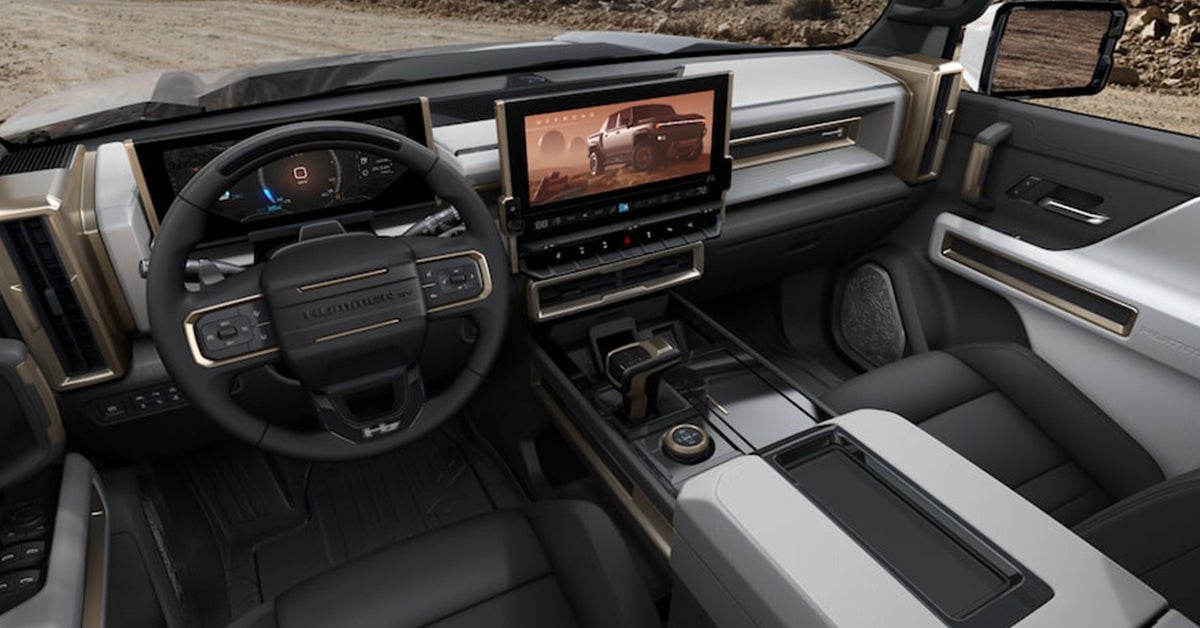
Mechanic checking the steering alignment on a GMC vehicle

Why Is My Car Pulling to the Side? Causes & Solutions

Have you ever felt your car tugging to one side, making every drive feel like a battle with the steering wheel? It’s frustrating, uncomfortable, and—let’s face it—unsafe. Whether you’re behind the wheel of a Buick Encore GX, a GMC Sierra 1500, or a GMC Yukon, any vehicle can experience this issue. But don’t worry, it’s not a mystery. Car pulling issues are often caused by something fixable, like poor wheel alignment, uneven tire pressure, or even brake wear. Understanding what's behind it and taking action can save you from bigger, more costly problems down the road. At Phillips Buick GMC, our expert technicians are here to help you pinpoint the cause and get your vehicle back to smooth driving. Read on to discover what’s making your car pull—and how we can help you fix it! Schedule Service Get Directions Contact Us What causes a car to pull to the side while driving? A car can pull to the side due to several reasons, including misaligned wheels, uneven tire pressure, or worn-out suspension components. Tire alignment problems and steering issues are common culprits that can cause the vehicle to drift off track. What Is the Role of Your Suspension System in Car Steering? The suspension system in your vehicle is far more than just a comfort feature. It plays a crucial role in how your car steers and handles the road. In simple terms, the suspension connects your vehicle’s wheels to its frame, allowing for smoother rides. It includes components like shocks, struts, springs, and control arms, all working together to absorb bumps and keep the car’s wheels in contact with the road. When your suspension system isn’t functioning properly, it can lead to car pulling issues that make driving uncomfortable and unsafe. One of the key reasons your car might pull to one side is poor alignment, which can be directly tied to a failing suspension system. Tire alignment problems are often a result of suspension components wearing down or becoming misaligned. When these parts, like control arms or struts, begin to fail, your tires don’t sit properly on the road. This causes uneven wear, misalignment, and the feeling that your car is fighting against you as you drive. If you’re driving a vehicle like the Buick Encore GX, GMC Sierra 1500, or GMC Yukon, this issue can be more noticeable due to their larger size and weight. If left unchecked, it can even lead to premature tire wear or more serious steering problems. Fixing car alignment starts with diagnosing the issue, and the suspension system is often at the heart of the problem. If your car pulls to one side or experiences steering problems, it could be that the suspension parts are too worn or damaged to support the wheels properly. A mechanic will typically check for signs of wear in the suspension, such as leaking shock absorbers or broken control arms. If they find any issues, they will fix the alignment and replace the worn parts to restore proper handling and alignment. Addressing suspension issues early can save you money in the long run. A well-maintained suspension system ensures that your car drives smoothly and stays aligned. Whether you’re behind the wheel of a Buick Encore GX navigating tight city streets or taking your GMC Yukon on a long road trip, a properly functioning suspension helps your car handle the road with ease. At Phillips Buick GMC, we specialize in car steering repair and alignment services to get you back on track safely. If your car is pulling or you notice any steering issues, it’s time to schedule a service appointment. The Mechanics Behind Car Pulling: Why Is Your Vehicle Moving Off Track? When your car pulls to the left or right, it can be more than just an annoying driving experience—it can signal an underlying mechanical issue. The most common cause of car pulling issues is poor alignment. Alignment refers to the angles at which your vehicle’s wheels meet the road. When the wheels are not properly aligned, they can cause your car to pull in one direction. This is why you may feel like you're constantly correcting the steering wheel, especially with larger vehicles like the Buick Encore GX, a GMC Sierra 1500, or a GMC Yukon. If alignment is the issue, fixing the alignment can immediately resolve the problem. Tire alignment problems are often caused by factors such as worn suspension parts, damaged tires, or impacts with road hazards. Over time, driving over potholes, hitting curbs, or even normal wear can throw off your vehicle’s alignment. When the alignment is off, one or more of the wheels may be angled incorrectly, which can cause your car to veer left or right. This problem is especially noticeable when driving at higher speeds or when the road isn’t perfectly flat. So, if your GMC Sierra 1500 or Buick Encore GX feels like it's drifting, it's time to look at your tire alignment and suspension components. Another reason for your car pulling to one side could be uneven tire pressure. If one tire is underinflated, it will cause that side of the car to sit lower, which can throw off your alignment. Even small changes in tire pressure can affect your steering, making the car pull to one side. Regularly checking and maintaining the correct tire pressure can prevent this issue from becoming a bigger problem. If tire pressure isn’t the culprit, your car could be dealing with a deeper issue such as suspension wear, faulty brakes, or a more severe alignment problem. Regardless of the cause, addressing the issue early can prevent further damage and expensive repairs. If you notice your car pulling off track, it’s essential to address the issue as soon as possible. Driving with a misaligned vehicle not only affects your car's handling but can also lead to uneven tire wear, reducing the lifespan of your tires. Fixing car alignment as soon as you notice the problem can save you from additional repairs down the road. At Phillips Buick GMC, we specialize in diagnosing and repairing alignment and steering issues. If your vehicle is pulling, let our team of experts inspect your car and help get you back on the road safely. Identifying the Root Cause of Your Car Pulling: How to Diagnose the Problem When your car pulls to one side, diagnosing the root cause is essential for solving the issue. The first step is to check the alignment. Car pulling issues often arise when the tires are misaligned. This is a common problem, especially in vehicles like the Buick Encore GX or GMC Sierra 1500, which may have experienced wear and tear from potholes or curbs. If the alignment is off, fixing car alignment can restore your car’s handling and prevent further problems. Misalignment can cause uneven tire wear and poor driving performance, so it’s important to address it right away. Next, inspect the tire pressure. Uneven tire pressure can also cause your car to pull. A tire that is under-inflated or over-inflated will change the height of the tire, affecting the car’s balance. This can lead to noticeable pulling to one side. Check each tire’s pressure regularly to ensure it’s within the recommended range. If one tire keeps losing pressure, there could be a slow leak or damage. Regular tire maintenance is crucial for avoiding tire alignment problems and steering issues in vehicles like the GMC Yukon, which is designed for larger loads and more demanding driving. If the alignment and tire pressure seem fine, the issue could be related to the suspension system or steering components. Worn suspension parts such as shocks, struts, or control arms can cause the car to pull. A faulty steering rack or damaged tie rods can also lead to pulling. These parts help keep your wheels in sync and support the overall handling of the car. When any of these parts fail, the car’s steering can become unstable, causing it to drift. If you're not familiar with these components, it's best to consult a professional mechanic for car steering repair. They can pinpoint the exact cause of the pull and recommend the necessary repairs to get your vehicle back on track. Diagnosing car pulling issues can be tricky, but with regular maintenance and a keen eye for signs of wear, you can catch problems early. Whether you drive a Buick Encore GX or a GMC Sierra 1500, staying on top of your vehicle's alignment, tire pressure, and suspension system is key to a smooth ride. If your vehicle is pulling, visit Phillips Buick GMC for a thorough inspection. Our team is ready to help diagnose and fix any issues, ensuring your car handles like it should. Fixing Car Pulling Issues: Solutions to Get Your Vehicle Back on Track If your vehicle is pulling to one side, it’s crucial to fix the problem as soon as possible. Ignoring car pulling issues can lead to uneven tire wear, poor handling, and even unsafe driving conditions. The first step to addressing the issue is to check the alignment. If your car’s alignment is off, it’s essential to fix car alignment. A misaligned vehicle, like the Buick Encore GX or GMC Sierra 1500, will struggle to stay straight, causing a noticeable pull. An alignment adjustment can often resolve this problem and restore your car’s handling. Next, examine the tire pressure. Low or uneven tire pressure can also cause your car to pull. To avoid tire alignment problems, make sure all tires are inflated to the manufacturer’s recommended level. Tires that are too high or low in pressure affect how your car handles and can lead to pulling. If one tire consistently loses air, it could be due to a slow leak or a puncture, and you’ll need to replace or repair the tire. Ensuring your tires are properly inflated helps maintain balanced traction and smooth driving. If alignment and tire pressure aren’t the issues, it may be time to focus on the suspension system or steering components. Worn shocks, struts, or other suspension parts can cause your vehicle to pull. In cars like the GMC Yukon, these parts may wear down over time, especially with frequent driving on rough roads. Damaged or worn-out steering components, such as the steering rack or tie rods, can also lead to pulling. These components are crucial for keeping your wheels moving together in the same direction. If you suspect a problem with your steering, seeking professional car steering repair is vital. A technician can inspect and repair or replace any faulty parts, ensuring your car drives straight again. Fixing car pulling issues requires addressing the root cause. Whether it’s alignment, tire pressure, or steering components, getting your car checked by a professional is the best way to restore its performance. At Phillips Buick GMC, we can help you diagnose and fix car pulling issues. Visit us today to ensure your Buick Encore GX, a GMC Sierra 1500, or a GMC Yukon is driving as smoothly as it should. Driving Safely While Waiting for Repairs: Tips for Temporary Solutions If your car is pulling to one side, it’s important to address the issue right away. However, if you can’t get to the mechanic immediately, there are ways to drive safely in the meantime. First, try to avoid high-speed driving. When your car has alignment issues or tire alignment problems, it can be harder to keep it straight at higher speeds. Driving slowly and carefully will help reduce the risk of further damage to your vehicle or causing a safety hazard. Whether you’re in a Buick Encore GX or a GMC Sierra 1500, driving cautiously is key to keeping control while waiting for repairs. Another temporary solution is to adjust your steering. If your car is pulling to one side, you might feel the need to steer harder in the opposite direction to keep it straight. While this can help keep your car on track, it’s not a permanent fix. Try to hold the steering wheel lightly without overcompensating. This will allow you to maintain better control, especially in your GMC Yukon. Avoid making sudden turns, as this could put extra strain on your vehicle’s steering and suspension. It’s also best to drive on smooth, flat roads if possible, as rough terrain can worsen the pulling issue. Lastly, make sure your tires are properly inflated. Low tire pressure can sometimes contribute to pulling issues, so check the air levels before heading out. Uneven tire pressure can make the pulling more noticeable and harder to manage. In vehicles like the Buick Encore GX or GMC Sierra 1500, checking the tire pressure regularly is an easy way to reduce the impact of alignment problems. Even though it’s not a fix, it can help make the drive safer while you wait for a professional inspection and car steering repair. While these tips can help you drive safely, they are temporary solutions. A professional mechanic should inspect your car as soon as possible to fix the alignment, address tire issues, and perform any needed car steering repair. Phillips Buick GMC is ready to assist with any car pulling issues, so don’t hesitate to schedule an appointment. How do I fix car alignment issues? To fix car alignment issues, you should take your vehicle to a certified mechanic who can adjust the angles of the wheels. This process, known as wheel alignment, ensures that the tires are set to the manufacturer’s specifications, preventing pulling and uneven wear. Can tire alignment problems cause uneven wear? Yes, tire alignment problems can cause uneven tire wear. Misaligned tires may cause certain areas of the tire to wear down faster than others, leading to reduced tire life and poor vehicle performance. How often should I check my car’s steering alignment? It is recommended to check your car’s steering alignment at least once a year or every 12,000 miles. If you notice any pulling or steering issues, it's important to have the alignment checked sooner. When should I replace tires to fix pulling issues? If your tires are worn unevenly or damaged, it’s important to replace them as soon as possible. New tires with proper tread will help restore balance and prevent further pulling issues caused by tire damage or excessive wear. Conclusion If you’re experiencing pulling issues with your vehicle, it’s important to get them checked out to ensure your safety on the road. At Phillips Buick GMC, we’re here to help. Our expert team can diagnose and fix any issues related to car alignment, tire wear, or steering problems, ensuring your car drives smoothly again. If you’re in the Lady Lake, Whitney, Leesburg, or Lisbon area, visit us to explore our wide selection of vehicles like the Buick Encore GX, GMC Sierra 1500, and GMC Yukon. Whether you’re looking for a new car or need service, we’re here for you. While you’re here, continue exploring our site to discover various trim, color, and engine options available on the 2025 GMC Sierra 1500. If you’re looking for extra savings, take advantage of our current offers after Hurricane Helene. Be sure to check out our Kelley Blue Book Instant Cash Offer, which allows you to get a fair value for your vehicle. If you need service, scheduling an appointment is easy! Visit our service page to book your appointment today. Our team is ready to assist with any vehicle maintenance or repair needs, from routine checks to more complex fixes. Let us help you get your vehicle back on track and driving like new again! Get Directions to Phillips Buick GMC Disclaimer: All information is provided for general informational and entertainment purposes only. While we strive for accuracy, we cannot guarantee that all content is complete, current, or error-free. Any reliance you place on such information is strictly at your own risk. This article may include opinions and is not endorsed by, or officially affiliated with, any vehicle manufacturer or brand. Always consult official sources – such as the vehicle’s owner’s manual, authorized dealerships, or certified professionals – for the most up-to-date and personalized information.

Technician checking a vehicle's tire pressure

What Should Your GMC's Tire Pressure Be?

When it comes to your GMC, keeping your tires properly inflated isn’t just about comfort—it’s about safety, performance, and long-term savings. Whether you're driving a rugged GMC Sierra 1500, a powerhouse GMC Sierra 2500, or a family-friendly GMC Acadia, maintaining the correct tire pressure is essential. But how do you know what that “correct” pressure is? It's simpler than you think, and getting it right can improve fuel efficiency, extend tire life, and enhance overall handling. Ready to take control of your GMC's tire health? Keep reading to learn exactly what tire pressure you should aim for, and if you ever need assistance, don’t hesitate to reach out to Phillips Buick GMC. We’re here to help you keep your ride in top shape! Explore Our Inventory Get Directions Contact Us What Does "PSI" Mean and Why It Matters When you hear "PSI," it’s a simple acronym for "pounds per square inch." It refers to the measurement of air pressure inside your tires. Understanding and maintaining the correct tire PSI is crucial for the safety, performance, and longevity of your GMC. Whether you're driving a GMC Sierra 1500, GMC Sierra 2500, GMC Yukon, or GMC Acadia, each vehicle has a specific PSI range that works best for its tires. This number ensures your tires can perform at their best, keeping your vehicle stable, safe, and efficient on the road. Why does the correct tire pressure matter so much? First, it affects how your tires grip the road. Under-inflated tires can cause sluggish handling, especially in heavy trucks like the GMC Sierra 2500, where extra weight and pressure are already a factor. On the other hand, over-inflated tires can reduce the contact area with the road, making your ride less smooth and compromising your vehicle’s control. If your tire pressure is too high or too low, it could lead to dangerous situations, especially on slippery or rough terrain. Maintaining the correct tire PSI also helps improve your fuel efficiency. When your tires are inflated properly, your GMC's engine doesn’t have to work as hard, meaning you’ll spend less on gas. For example, the recommended tire pressure for a GMC Sierra 1500 might be around 35 PSI for normal conditions, but it can vary based on the load or driving style. The same goes for the GMC Acadia, where the proper tire pressure ensures better handling and fuel economy. Regularly checking tire pressure, especially before long trips, can save you money and keep your GMC running smoothly. Always use a reliable tire gauge to check tire pressure, or stop by Phillips Buick GMC for a quick tire inspection. How to Check Your GMC’s Tire Pressure Checking your GMC's tire pressure is a simple task that can make a big difference in your vehicle's performance. Whether you drive a GMC Sierra 1500, GMC Sierra 2500, GMC Yukon, or GMC Acadia, knowing how to check tire pressure is an essential part of vehicle maintenance. Luckily, it’s easy to do, and you don’t need to be a mechanic to get it right. To start, you’ll need a tire pressure gauge. These gauges come in two main types: analog and digital. Both work well, but digital gauges are often easier to read. Begin by removing the valve cap from one of your tires. Place the gauge onto the valve stem and press down firmly. You’ll hear a slight hiss of air, but don’t worry. The gauge will give you a reading of your tire pressure in PSI (pounds per square inch). Compare this number with the recommended tire pressure for your GMC, which you can find in your owner's manual or on the door frame of your vehicle. For example, the correct tire PSI for a GMC Sierra 1500 might be around 35 PSI, while the GMC Sierra 2500 may require slightly higher pressure, depending on the load. It’s important to check tire pressure when the tires are cold. This means checking them before you’ve driven more than a couple of miles. Driving warms up the tires and can give you a falsely high reading. If the tire pressure is too low, it’s time to add air. You can visit a nearby gas station or tire service center to top off your tires. If the tire pressure is too high, release some air by pressing down on the valve stem. Always make sure you’re following the correct tire PSI for your specific vehicle, as outlined in the GMC PSI guide. Checking tire pressure regularly will not only improve safety but also enhance fuel efficiency and extend the life of your tires. What is the Correct Tire Pressure for Your GMC? The correct tire pressure for your GMC depends on the model and its specific needs. Whether you drive a GMC Sierra 1500, GMC Sierra 2500, GMC Yukon, or GMC Acadia, each vehicle has a recommended PSI (pounds per square inch) to ensure safe and efficient driving. Tire pressure affects handling, fuel economy, and overall safety, so it’s important to follow the correct tire PSI guidelines for your vehicle. For most GMC trucks like the Sierra 1500, the ideal tire pressure is typically around 35 PSI. However, this number can vary based on factors such as load and driving conditions. The GMC Sierra 2500, which is built for heavier hauling, often requires higher PSI, ranging from 50 to 75, depending on the weight it carries. Similarly, larger SUVs like the GMC Yukon may need a slightly higher PSI for better performance, while the GMC Acadia, a more compact SUV, might require around 32 to 35 PSI. Always check your vehicle’s GMC PSI guide for the most accurate and up-to-date information. You can easily find the recommended tire pressure for your GMC by checking the door frame on the driver's side. There, you’ll find a sticker with the correct tire pressure for your specific model. This number should be your reference point when checking tire pressure. If you’re unsure, your owner's manual is another great resource for the correct tire PSI. Always use a reliable gauge to check tire pressure and make sure you are within the recommended range. Keeping your tires at the correct pressure not only ensures better driving performance but also saves you money on fuel and extends the life of your tires. Factors That Can Affect Your GMC's Tire Pressure Several factors can influence your GMC's tire pressure, and understanding them will help you maintain the correct PSI for your vehicle. One of the most common factors is temperature. As the weather changes, so does the air in your tires. On colder days, the air in your tires contracts, causing a drop in tire pressure. Conversely, on hot days, the air expands, increasing the PSI. For example, if you’re driving a GMC Sierra 1500, the cold winter months can reduce tire pressure by about 1-2 PSI for every 10°F drop in temperature. This is why it’s especially important to check tire pressure regularly in extreme weather conditions. Another factor that can affect your GMC's tire pressure is the weight of the load you’re carrying. If you’re hauling a heavy load in your GMC Sierra 2500, for instance, your tires will need more pressure to support the additional weight. The correct tire PSI is crucial for keeping the tires properly inflated when you’re transporting heavy items. Too much weight with too little tire pressure can lead to tire wear and poor handling. Make sure to consult your GMC PSI guide for the recommended tire pressure when carrying heavy loads. Driving habits can also impact your tire pressure. Frequent high-speed driving or aggressive braking can cause the tires to heat up, affecting the pressure. For vehicles like the GMC Yukon or GMC Acadia, which are often used for long trips or daily commutes, keeping an eye on tire pressure after long drives is important. To maintain proper tire pressure, always check your tires when they’re cold, and never rely on the readings after driving long distances. Proper tire pressure ensures your vehicle’s performance, improves fuel efficiency, and keeps you safe on the road. What Happens If Your GMC Tire Pressure Is Too Low or Too High? Maintaining the correct GMC tire pressure is crucial for the safety and performance of your vehicle. If your tire pressure is too low, your tires will not perform at their best. For example, if you drive a GMC Sierra 1500 and your tire pressure is lower than the recommended PSI, your tires will have more contact with the road. This increases friction, causing your tires to wear out faster. Underinflated tires also reduce fuel efficiency, meaning you’ll spend more on gas. Plus, low tire pressure can cause your GMC to handle poorly, making it harder to steer, especially in emergencies. On the other hand, if the tire pressure is too high, the situation is just as problematic. Overinflated tires, especially on vehicles like the GMC Sierra 2500 or GMC Yukon, can lead to a rougher ride. They may also become more prone to damage, as the extra pressure makes the tire less flexible. This could increase the risk of a blowout, particularly if you’re driving at high speeds or on rough terrain. Too much pressure also reduces the tire’s grip on the road, making it harder to control your vehicle in wet or icy conditions. It’s vital to follow the GMC PSI guide for your specific model, whether you drive a GMC Acadia or another vehicle, to keep the tire pressure within the recommended range. Regularly checking your tire pressure ensures that your GMC is performing at its best. Use a tire pressure gauge to check tire pressure when the tires are cold for the most accurate reading. If you find that your tire pressure is off, either too low or too high, adjust it according to the manufacturer’s guidelines. Keeping the correct tire PSI improves safety, enhances performance, and extends the life of your tires. Tips for Maintaining Proper Tire Pressure in Your GMC Maintaining proper tire pressure in your GMC is essential for both safety and performance. The correct tire PSI ensures that your tires wear evenly, improving their lifespan and saving you money in the long run. To keep your GMC running smoothly, start by checking your tire pressure regularly. Ideally, you should check tire pressure at least once a month and before long trips. Make sure to do this when the tires are cold, as heat can cause the air pressure to rise, giving you an inaccurate reading. For models like the GMC Sierra 1500 or GMC Yukon, it’s crucial to follow the GMC PSI guide closely. These models often require different PSI levels than smaller vehicles, especially if you're hauling heavy loads. If your GMC is equipped with a Tire Pressure Monitoring System (TPMS), it will alert you when a tire is underinflated. However, don’t rely solely on the TPMS. It’s still a good idea to manually check tire pressure with a gauge to ensure the reading is accurate. Another tip is to inspect your tires for damage. Even if the pressure is correct, a nail or puncture can cause slow leaks, leading to underinflation. If you notice your tire pressure consistently dropping, it may be time to check for leaks or even visit your local service center. Models like the GMC Sierra 2500 and GMC Acadia, which are built for tougher conditions, may experience more wear on tires, so be proactive in checking for damage. Proper maintenance of tire pressure helps improve fuel efficiency, ride quality, and safety. Taking a few minutes each month to check your tire pressure can make a big difference! What is the correct tire pressure for GMC vehicles? The correct tire pressure for GMC vehicles typically ranges between 30 and 35 PSI, depending on the model and load. For heavy-duty trucks like the GMC Sierra 2500, the pressure may be higher. Always refer to the GMC PSI guide for your specific vehicle. How often should I check my tire pressure? You should check your tire pressure at least once a month and before any long trips. It's also a good idea to check it when the tires are cold to ensure an accurate reading. What happens if my tire pressure is too low or too high? If your tire pressure is too low, it can cause poor fuel efficiency, uneven tire wear, and handling issues. On the other hand, if your tire pressure is too high, it can lead to a rough ride, reduced traction, and premature tire damage. Can I adjust GMC tire pressure myself? Yes, you can adjust your GMC tire pressure yourself using a tire pressure gauge and an air pump. However, if you're unsure about the correct pressure or notice consistent issues, it's a good idea to consult a professional. Where can I find the recommended PSI for my GMC? The recommended PSI for your GMC is listed in the owner's manual and on a sticker located on the driver’s side door jamb. The sticker will also specify the correct tire pressure for both front and rear tires. Get Your GMC's Tires Checked at Phillips Buick GMC At Phillips Buick GMC, we understand that maintaining the right tire pressure is crucial for your vehicle’s performance, safety, and fuel efficiency. If you need more information on keeping your GMC in top shape, feel free to reach out to us. Our team is here to assist with all your vehicle maintenance questions. We also invite customers from Lady Lake, Whitney, Leesburg, and Lisbon to explore our wide selection of new and pre-owned vehicles. Whether you're interested in a powerful GMC Sierra 1500, a heavy-duty GMC Sierra 2500, or a family-friendly GMC Yukon or GMC Acadia, we have something for everyone. Visit us today to test drive these models and more. While you're here, check out some of our other helpful content, such as how Phillips Buick GMC sponsors the VetSports Golf Tournament with the Buick Envista as a Hole-in-One prize. Also, don’t miss our guide on 7 Reasons to Trade In Your Used Car in Fruitland Park, Florida, or find out What You Should Look for in a Used Car. For more detailed information on tire care and maintenance, visit our page about tire services here. Our team is always ready to help keep your vehicle running smoothly. Get Your Tires Checked Get Directions to Phillips Buick GMC Disclaimer: All information is provided for general informational and entertainment purposes only. While we strive for accuracy, we cannot guarantee that all content is complete, current, or error-free. Any reliance you place on such information is strictly at your own risk. This article may include opinions and is not endorsed by, or officially affiliated with, any vehicle manufacturer or brand. Always consult official sources – such as the vehicle’s owner’s manual, authorized dealerships, or certified professionals – for the most up-to-date and personalized information.
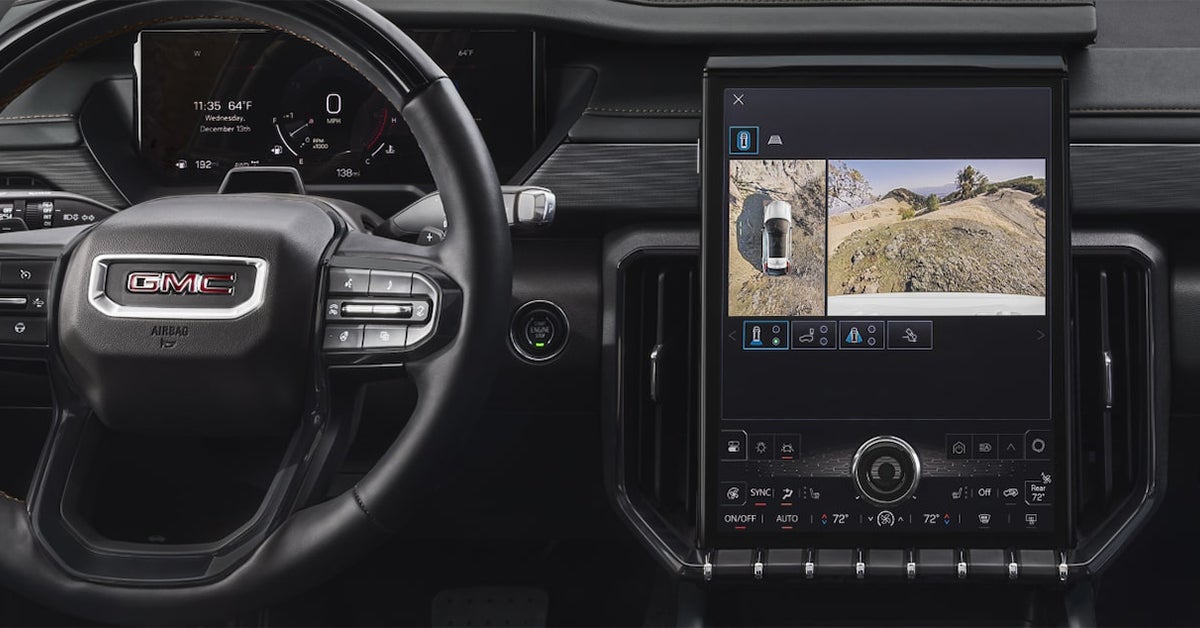
Odometer that just hit 100000 miles

So Your Odometer Just Passed 100K: Now What?

Your car's odometer just hit 100,000 miles—a significant milestone that often stirs mixed feelings. For some, it’s a moment of pride, knowing they’ve maximized their vehicle’s use; for others, it might bring a bit of anxiety about what lies ahead. But don’t worry—reaching 100,000 miles is not a signal that your car is nearing the end of its journey. Thanks to advancements in automotive technology and better maintenance practices, many vehicles today are built to last well beyond 200,000 miles with proper care. This milestone is less about an impending end and more about taking steps to ensure your car’s longevity. So, what should you do next to keep your car running smoothly for years to come? The secret lies in understanding the specific maintenance your car needs as it ages, addressing wear and tear proactively, and staying committed to a regular care routine. By following these guidelines, you’ll not only extend the life of your vehicle but also enjoy many more miles on the road with confidence. Service Department Get Directions Contact Us The Importance of Regular Maintenance: Beyond the 100K Mark Reaching 100,000 miles is a significant milestone in any vehicle's life. Whether you're cruising in a GMC Sierra 1500, a Buick Envision, or a GMC Savana, it's crucial to understand that regular maintenance is the key to ensuring your vehicle stays in top shape. At this point, your car needs more than just the basics—it requires a plan to keep running smoothly well beyond the 100K mark. A proper 100K car checkup is essential to prevent future breakdowns and costly repairs. Car maintenance at 100K isn't just about changing the oil and rotating the tires. This is the time to replace parts that wear out over time, such as belts, hoses, and spark plugs. For a high-mileage vehicle, this step can make all the difference. Regular checks can also catch small issues before they become big problems. For example, the water pump and timing belt, often overlooked, should be replaced around 100K miles. If you’re driving a Buick Encore GX, the engine’s health depends on getting these parts checked early. Neglecting this could lead to overheating or worse—a serious engine failure. In addition to key parts, maintaining your car's fluids is essential. Make sure that oil changes are consistent, and that other fluids, such as brake and power steering fluid, are topped off regularly. A good practice is to use synthetic oils for longer-lasting engine health, which is ideal for both the GMC Savana and the GMC Sierra 1500. Regular fluid checks and replacements should be part of your high-mileage care routine. Even with top-of-the-line cars like the Buick Envision, these small efforts ensure that your vehicle runs efficiently and helps avoid the need for expensive repairs. Remember, regular visits to your dealership for scheduled checkups are not just about keeping your car running—they also help maintain its value. A well-maintained car is more reliable, safer, and holds its value longer. Whether you're driving around Lady Lake or heading out for a road trip, proper maintenance at 100K miles will extend your vehicle’s lifespan. If you’re unsure about what maintenance tasks your vehicle needs, don’t hesitate to reach out to Phillips Buick GMC. Our expert team is here to guide you every step of the way. Common Maintenance Checks for High Mileage Vehicles When your car hits the 100K mark, it’s time to take a closer look at its parts. High mileage care is vital for ensuring your vehicle keeps running smoothly. Whether you drive a GMC Sierra 1500, a Buick Envision, or a GMC Savana, regular checks will keep it in top condition. In fact, one of the best things you can do for your vehicle is a 100K car checkup. Start with the engine. After 100,000 miles, parts like the timing belt and spark plugs are more prone to wear. These parts should be checked and replaced as needed. A worn-out timing belt can cause engine failure, so it’s important not to overlook it. The Buick Encore GX, for example, will benefit from regular engine checks. Another critical area is the air and fuel filter, which should also be replaced during a high-mileage check. Keeping these clean ensures your engine runs more efficiently. Don’t forget the brakes. Regular brake inspections are a must for vehicles at 100K miles. Brake pads, rotors, and fluid need to be checked to ensure your safety. If you drive the GMC Savana or GMC Sierra 1500, the heavy load they carry means extra strain on the braking system. At 100,000 miles, these parts are likely to need replacement. High-mileage care should also include checking the suspension. Worn shocks and struts can cause poor handling, so make sure they are inspected and replaced if necessary. Finally, the fluid system is an area that often gets overlooked. Regular fluid checks are essential, especially for high-mileage vehicles. Be sure to have the coolant, transmission, and power steering fluids checked at your 100K car checkup. The Buick Envision, for example, depends on proper fluid levels to keep its systems running smoothly. Neglecting fluid maintenance can lead to expensive repairs down the road. With these simple checks, you can ensure your car continues to perform well as it moves past 100K miles. Contact Phillips Buick GMC for a comprehensive 100K service checkup today. Fluids and Filters: The Lifeblood of Your Car After 100K When your car hits 100K miles, the fluids and filters become even more important. These are the lifeblood of your vehicle. Without them, systems like the engine and transmission won’t function properly. At 100K, it’s crucial to replace fluids and filters regularly to maintain high-mileage care. Whether you're driving a GMC Sierra 1500 or a Buick Encore GX, these components must be checked and topped off. Regular fluid checks ensure your car stays in great condition and helps avoid costly repairs. Start with the engine oil. It lubricates the engine, keeping all parts moving smoothly. Over time, oil breaks down, losing its effectiveness. After 100K miles, changing the oil and replacing the oil filter is essential. For vehicles like the GMC Savana, which is often used for heavy-duty tasks, regular oil changes help prevent engine strain. Make sure to use the right type of oil for your vehicle’s make and model. Fresh oil can extend the life of your engine and improve performance. Don’t forget the other fluids. Transmission fluid, brake fluid, and coolant all play a role in keeping your vehicle running. The Buick Envision, for example, needs fresh transmission fluid to keep shifting gears smoothly. Brake fluid ensures your braking system works properly. If left unchanged, old fluids can cause the systems to malfunction, leading to expensive repairs. A simple check during a 100K car checkup will help keep these systems working as they should. Replacing filters, such as the air and fuel filters, is also important. Dirty filters can reduce fuel efficiency and cause engine performance issues. These small steps can make a big difference in keeping your car in excellent shape after hitting the 100K mark. Make sure you visit Phillips Buick GMC for a comprehensive 100K service checkup. With proper fluid and filter maintenance, your vehicle will continue to run at its best for years to come. Understanding Your Vehicle’s Owner Manual When your vehicle hits the 100K mark, it’s time to get familiar with your owner’s manual. The manual provides vital information for high mileage care. It outlines specific maintenance tasks, service intervals, and parts that need attention. For example, the 100K service tips for your GMC Sierra 1500 or Buick Encore GX may vary based on the manufacturer’s recommendations. Your manual will tell you exactly when to replace key components like belts, hoses, and filters. Knowing these details will ensure you stay on track with your car maintenance and avoid major issues. One of the most important things the manual covers is your vehicle’s recommended maintenance schedule. Many car owners overlook this, but it’s essential for the health of your car. The 100K car checkup is not just a suggestion but a crucial part of keeping your car running smoothly. The manual will guide you on when to replace fluids, change the oil, and even rotate the tires. The Buick Envision, for instance, may have different service needs than a GMC Savana, depending on the type of driving you do. The owner’s manual ensures that you follow the right steps for your vehicle, tailored to its exact needs. It’s also important to understand the warning signs that appear in your manual. It will help you recognize when something is wrong with your vehicle, such as unusual noises or dashboard lights. By catching small issues early, you can prevent them from becoming costly repairs. For high mileage vehicles, these signs are even more critical, especially if you're driving a model like the GMC Sierra 1500, which can handle a lot of miles if properly maintained. Take the time to read through your manual. It’s a simple way to stay informed about your car's needs, making your 100K service process easier and more effective. At Phillips Buick GMC, we’re here to help you understand your car’s owner manual and provide expert advice on the best 100K service tips. Visit us for a comprehensive 100K car checkup and ensure your vehicle stays in great condition for many more miles ahead. Identifying Warning Signs: When to Take Action Before It's Too Late When your vehicle reaches 100K miles, it's essential to stay alert for warning signs. High mileage care means paying attention to your car’s behavior and taking action before problems escalate. If you drive a GMC Sierra 1500, Buick Encore GX, or GMC Savana, you're driving a robust vehicle that can go the distance—but only if you stay proactive. Knowing what warning signs to look for is key to avoiding breakdowns and expensive repairs. One of the most obvious signs to watch for is strange noises. If your car begins making odd sounds, like grinding, squealing, or thumping, don’t ignore it. These noises could indicate worn-out brake pads, loose belts, or other issues that need immediate attention. Whether you’re driving a Buick Envision or a GMC Savana, early detection can save you from needing costly repairs. Always check your vehicle’s fluid levels too. Low oil or coolant levels can be signs of a deeper issue, such as a leak or an engine problem. Regularly checking your fluids is an easy way to spot problems early. Another common warning sign is dashboard lights. If a warning light appears, don’t wait for it to go away. A check engine light, low tire pressure light, or oil change indicator often means it's time for a 100K car checkup. These warning lights are your car’s way of telling you it needs attention. For example, your Buick Encore GX may show the check engine light if there’s a problem with the engine or exhaust system. Likewise, if you notice a sudden drop in performance, such as poor acceleration or rough idling, take your car in for a service check. Even minor changes in your car's behavior should be investigated. Lastly, watch for changes in the handling of your vehicle. If your GMC Sierra 1500 or Buick Envision starts pulling to one side, or if you feel vibrations while driving, it could indicate issues with the suspension or alignment. These problems can worsen if left unchecked and impact the safety of your car. Paying attention to how your vehicle drives is a simple yet effective way to catch small issues early. At Phillips Buick GMC, we are here to help identify and address these warning signs before they become bigger problems. Bring your car in for a 100K service checkup and ensure it’s running safely for the long haul. What car maintenance should I do after 100,000 miles? After 100,000 miles, you should focus on replacing vital components like the timing belt, spark plugs, and transmission fluid. It's also crucial to check the brakes, tires, and suspension for wear, along with ensuring that all fluids (oil, coolant, brake, power steering) are topped up and free of contaminants. How do I know if my car needs a 100K service checkup? If your car is reaching 100,000 miles and you haven’t had a recent checkup, it’s time for a 100K service. Look for warning signs such as the check engine light, strange noises, or a decrease in performance. Consult your vehicle’s owner’s manual for manufacturer-recommended services at this milestone. What are common high-mileage car issues? Common high-mileage car issues include engine wear, transmission problems, suspension wear, brake system degradation, and electrical issues. Depending on the make and model, parts like the timing belt, water pump, or fuel injectors may also begin to fail after 100,000 miles. Should I replace major components at 100K miles? It’s often recommended to replace critical components like the timing belt and spark plugs around 100K miles, depending on your vehicle’s make and model. Check your owner’s manual for manufacturer recommendations. Replacing these parts can prevent more expensive repairs down the road. How can I extend the life of my car after 100,000 miles? To extend the life of your car, stick to a consistent maintenance schedule, check your fluid levels regularly, and address issues as soon as they arise. Additionally, avoid harsh driving habits, and keep your car clean to protect its exterior and interior from wear. Regular servicing at trusted locations, like Phillips Buick GMC, can ensure your vehicle continues to run smoothly. Get Your Car Checked After Reaching 100,000 Miles As your car reaches the 100,000-mile mark, it’s important to stay on top of regular maintenance to keep it running smoothly. At Phillips Buick GMC, we’re here to help you make informed decisions about the care your vehicle needs after this milestone. Whether you're looking to extend the life of your current vehicle or explore new options, we have a wide selection of vehicles to suit your needs. If you're in Lady Lake, Whitney, Leesburg, or Lisbon, come visit us and check out our inventory, including the GMC Savana, GMC Sierra 1500, Buick Encore GX, and Buick Envision. Our team is ready to assist you in finding the perfect vehicle, whether it’s new, pre-owned, or a great leasing option. If you’re considering purchasing or leasing a vehicle, we also invite you to explore our blog on New vs Used vs Leasing in Fruitland Park, Florida, where you can find useful insights. At Phillips Buick GMC, we take pride in our Pre-Owned Powerhouse of Used Cars and offer expert tips on leasing a Buick or GMC in Fruitland Park. Whether you're looking to upgrade your vehicle or simply need expert car maintenance advice, we have you covered. For more details on servicing your vehicle after 100K miles, visit our service page or contact us today. Let us help you keep your car in top shape, and don’t forget to explore our other content for more valuable tips on vehicle care and ownership. Schedule Your Car's Checkup Get Directions to Phillips Buick GMC Disclaimer: All information is provided for general informational and entertainment purposes only. While we strive for accuracy, we cannot guarantee that all content is complete, current, or error-free. Any reliance you place on such information is strictly at your own risk. This article may include opinions and is not endorsed by, or officially affiliated with, any vehicle manufacturer or brand. Always consult official sources – such as the vehicle’s owner’s manual, authorized dealerships, or certified professionals – for the most up-to-date and personalized information.
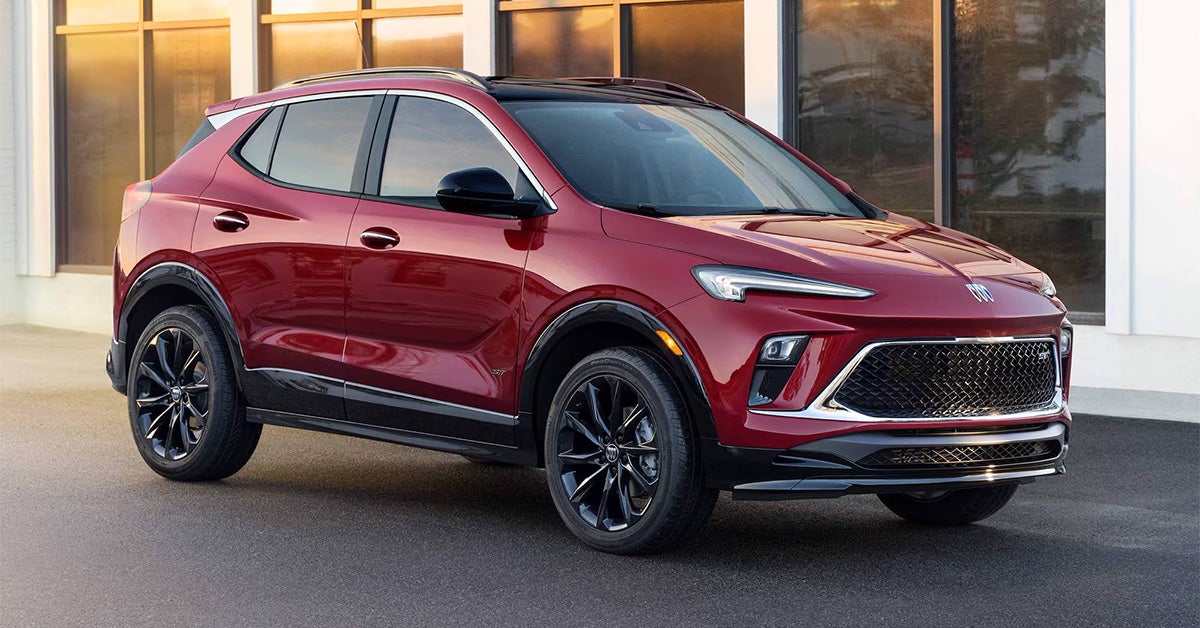
woman signing paperwork with a car ssalesman while sitting in a car

Test Driving a Car? Here's What to Bring With You

Taking a car out for a test drive is one of the most exciting steps in finding your next vehicle. But did you know there are a few essentials you should bring with you to make the most of the experience? Whether you're eyeing a rugged GMC Sierra or a luxurious Buick Enclave, being prepared ensures you can focus on what matters—finding the perfect fit. At Phillips Buick GMC, we’re here to make your test-driving journey seamless and enjoyable. Stop by our dealership or give us a call today, and let us help you get behind the wheel of your dream car! What should you bring for a car test drive? Bring your driver’s license, proof of insurance, and a notebook to jot down any observations or questions. Why a Thorough Test Drive Matters A test drive is more than just a quick trip around the block—it’s a vital part of finding the right vehicle for your needs. It’s the best opportunity to experience how a car fits your lifestyle, offering a chance to assess performance, comfort, and functionality. Whether you’re considering the smooth handling of the Buick Encore GX, the rugged power of the GMC Sierra 1500, or the family-friendly capabilities of the GMC Yukon, the right test drive will help you understand how each vehicle performs where it counts. A thorough test drive can help you gauge how a car will handle real-life driving situations, from daily errands to long road trips. Before you even step into the car, think about what you need from a vehicle. Does it have enough space for your family? Whether you're testing the compact Buick Encore GX or the spacious GMC Yukon, the amount of legroom and cargo space should meet your needs. Are the seats comfortable for long trips, or do they provide enough support for daily commuting? If you're considering the GMC Sierra 1500, you’ll want to know how comfortable it feels when sitting behind the wheel for extended periods, especially on rougher terrain or on a long haul. How does the car handle on city streets, highways, or even off-road conditions if applicable? By developing a test drive checklist that includes these key points, you can ensure you get the most out of the experience. It’s also important to bring the right items with you to the test drive to get a true sense of the vehicle's fit in your life. Don’t forget your driver’s license and proof of insurance—these are essential for any test drive. Think about the daily items you typically carry in your car, like a car seat for children, pet carriers, or sports gear. By bringing these along, you can test how well the car meets your specific needs. For instance, if you have kids, the GMC Yukon may offer more space for a car seat, while the Buick Encore GX may offer more ease of access for daily errands. Carrying your everyday items ensures that the car will truly serve you well after you drive off the lot. Test-driving tips can also make a big difference in helping you feel confident about your decision. Start slow and drive calmly to get a feel for the car’s comfort, braking, and handling. Pay attention to how the seats feel, how easy it is to adjust the mirrors, and how quickly you can adapt to the controls. Then, take the vehicle on faster roads to test its acceleration and braking. How does it feel when you step on the gas? Does the car accelerate smoothly, or does it hesitate? Does it brake sharply or smoothly? Testing these elements on highways or side streets will help you understand how the car performs in different conditions. Don’t rush through the test drive—take your time. The more you test and notice, the better decision you can make. By following these simple steps, you’ll leave Phillips Buick GMC with a clear sense of whether the Buick Encore GX, GMC Sierra 1500, or GMC Yukon is the right fit for your lifestyle. We understand that choosing a car is a big decision, and we’re here to help make sure that the vehicle you choose feels just right. Our team is ready to assist you in finding a car that checks off all the boxes, from comfort and handling to practicality and performance. Come test drive with us today! What to Bring for a Stress-Free Test Drive Heading out for a car test drive? Proper preparation can make all the difference. With just a little planning, your experience can be smooth, enjoyable, and stress-free. Whether you're testing the Buick Encore GX, the GMC Sierra 1500, or the spacious GMC Yukon, having the right items on hand helps you make the most of your time at the dealership and ensures you can properly evaluate the vehicle. Start with the essentials. You’ll need your driver’s license and proof of insurance—these are standard requirements for any test drive. Without these documents, you won’t be able to take the vehicle out on the road. It’s also a good idea to bring a pen and notebook or your phone, so you can jot down any important features or questions that come to mind during your test drive. Whether you're considering the stylish Buick Encore GX or the rugged GMC Sierra 1500, making notes helps you remember key details when you're ready to make a decision. Think about your daily needs and how they might impact your experience. If you often carry kids or pets, be sure to bring a car seat or a pet carrier to test the fit. You’ll want to know how easy it is to install a car seat in the back of the Buick Encore GX or how much space is available in the GMC Yukon for your family. Similarly, loading up bulky items, like a stroller, luggage, or sports gear, allows you to evaluate whether the vehicle’s cargo space is sufficient for your lifestyle. If you’re used to hauling gear in your vehicle, the GMC Sierra 1500’s truck bed or the Yukon’s spacious interior might be a better fit. Comfort matters, too. Wear the shoes you typically drive in. This will help you get a feel for how the pedals respond, whether you're driving the smaller Encore GX or the larger GMC Yukon. During your test drive, don’t forget to test the vehicle’s controls. Are the air conditioning settings easy to adjust while driving? Can you quickly navigate the touchscreen display for music, navigation, or phone calls? Make sure the seating adjustments are straightforward, and that the seats provide enough comfort and support for your needs. These small steps ensure the vehicle fits your daily routine, whether you're looking for a compact SUV or a powerful, full-sized truck. By bringing the right items and thinking through your daily needs, you'll be able to assess the vehicle from all angles. This will help you decide if it truly fits your lifestyle. At Phillips Buick GMC, we're dedicated to making your test drive experience as smooth and stress-free as possible. Our friendly staff is here to help you explore our wide selection of vehicles, ensuring that you find the right car or truck for you. So, come prepared, and leave with the confidence to make the best choice! Preparing for Your Test Drive Like a Pro When you’re ready to test drive a car, being well-prepared can make all the difference. Whether you’re interested in a compact Buick Encore GX, a powerful GMC Sierra 1500, or a spacious GMC Yukon, a little planning beforehand can help you get the most out of your experience. Start by reviewing your test drive checklist before you head to the dealership. This will ensure you don’t overlook any important details and make the best decision possible. First, gather the essentials. Your driver’s license and proof of insurance are required for any test drive, so make sure to have them on hand. It’s a good idea to bring a notepad or use your phone to take notes throughout the test drive. As you drive, jot down your thoughts on key factors like the comfort of the ride, how the car handles, and the ease of using the vehicle’s features. This will help you remember important details later on, especially when comparing multiple vehicles, such as the Buick Encore GX and the GMC Sierra 1500. Next, think about your everyday needs and how they might impact your driving experience. For example, if you often carry a lot of gear, bring along a bag or cooler to test the vehicle’s cargo space. Does the Buick Encore GX offer enough storage for your daily needs, or do you need the larger capacity of a GMC Yukon? If you have young children, consider bringing a car seat to check how easily it fits into the back of the car. These simple steps will give you a better understanding of how the vehicle works with your lifestyle and help you assess whether it will be a good fit for your daily routine. Don’t forget to think about the type of driving conditions you typically encounter. Try to drive the car in the environments where you’ll be spending the most time. For example, take the car on city streets, highways, and even rougher roads if possible. This will give you a real sense of how the car handles in different situations. If you’re considering a rugged truck like the GMC Sierra 1500, you’ll want to see how it performs on highways and rougher terrain. On the other hand, if you're looking at the family-friendly GMC Yukon, you may want to test how it feels when navigating tight city streets or when parking in crowded areas. A well-prepared test drive ensures you make an informed decision. Whether you're drawn to the efficiency and compact nature of the Buick Encore GX or the power and space offered by the GMC Sierra 1500 or GMC Yukon, taking the time to plan ahead will help you get the most out of your experience. By thinking through your everyday needs and reviewing your checklist, you can make sure you test drive a vehicle that truly fits your lifestyle. What to Look for Behind the Wheel When you're behind the wheel of a car during your test drive, your goal is to assess how the vehicle feels and how well it fits your driving needs. Whether you’re driving a compact Buick Encore GX, a rugged GMC Sierra 1500, or a spacious GMC Yukon, you should feel comfortable, confident, and in control. Comfort and ease of use should be your top priorities. First, start by adjusting the seat and steering wheel. Ensure that both are easy to adjust and that you can find a comfortable driving position. The seat should provide ample support for your back and legs, especially if you plan to take long trips. Pay attention to the materials of the seats too, as comfort levels can vary between models. Whether you prefer a firm seat or something more plush, ensure it meets your comfort preferences. Next, focus on the car’s handling, particularly when making turns or quick stops. Does the steering feel smooth, or is it jerky? A smooth steering experience is essential, especially when navigating tight spaces or making quick lane changes. For larger vehicles like the GMC Yukon or Sierra 1500, you’ll want to ensure the car handles well, even when driving at higher speeds or taking sharp turns. The last thing you want is to feel like you’re losing control, so a steady and responsive ride is key. Make sure the vehicle stays stable on the road and provides the confidence you need, whether you’re cruising on the highway or tackling winding backroads. Another critical aspect to evaluate is visibility. Make sure there are no significant blind spots that could interfere with your ability to see other vehicles or pedestrians. Adjust the mirrors, and check how easily you can see out of the front, sides, and rear. A good line of sight is crucial for safety, especially when driving a larger vehicle like the GMC Sierra 1500, where visibility can sometimes be an issue due to the truck's size. You’ll want to feel confident while parking or changing lanes. Lastly, don’t overlook the car’s features. Test out the infotainment system to see how user-friendly it is. Are the controls easy to reach and use? Is the touchscreen responsive, and does it pair with your smartphone effortlessly? Make sure to test out other features, such as air conditioning and seat controls, to ensure everything works properly. This is your opportunity to see if the Buick Encore GX, GMC Sierra 1500, or GMC Yukon fits seamlessly into your daily routine and if you’re comfortable using the car’s technology. By paying attention to these key details during your test drive, you can determine if the vehicle is a good fit for your lifestyle and driving preferences. Whether you’re looking for a compact, efficient ride or a powerful, spacious SUV or truck, making sure the car feels right behind the wheel is crucial for a satisfying driving experience. Tips to Get the Most Out of Your Test Drive To get the best experience during your car test drive, it’s important to come prepared. Start by creating a test drive checklist. This list will help you focus on the key features that matter most to you, like comfort, handling, and safety. Whether you’re test driving a Buick Encore GX, GMC Sierra 1500, or GMC Yukon, it’s essential to be thorough and consider all the factors that could affect your driving experience. When you go for your test drive, bring along your everyday items such as your phone, wallet, and any kids or pets if they’re part of your daily routine. Doing so helps you assess how well the car fits your lifestyle. For instance, check if your phone connects easily to the infotainment system or if there’s enough space for your bags or a stroller in the backseat. These small details make a big difference when choosing a vehicle. It’s also important to drive in different conditions. Take the car on highways, side streets, and even bumpy roads if possible. This will give you a feel for how the car performs in a variety of situations. Pay close attention to the ride quality, the engine’s response, and how the car handles turns. A car like the GMC Yukon, with its larger size, may handle differently than a more compact vehicle like the Buick Encore GX, so take note of how each one drives under different conditions. Finally, don't hesitate to ask questions during your test drive. The salesperson is there to help and guide you through the features and benefits of the vehicle. Make sure to inquire about things that are most important to you, such as fuel efficiency, safety ratings, or towing capacity. If you’re considering a powerful truck like the GMC Sierra 1500, it’s especially important to ask about towing capabilities and payload ratings to ensure it meets your needs. By being prepared and asking the right questions, you can make the most out of your test drive experience and confidently choose the right vehicle for your lifestyle. Common Questions About Taking a Test Drive How long should a test drive take? A typical test drive lasts between 15 and 30 minutes, depending on the route and your preferences. What questions should I ask during a car test drive? Ask about the car’s features, fuel efficiency, maintenance needs, warranty coverage, and any available promotions or deals. Can I test-drive multiple cars in one visit? Yes, most dealerships allow you to test-drive multiple vehicles in a single visit to compare options. Are there any documents I need for a test drive? You’ll need a valid driver’s license. Some dealerships may also ask for proof of insurance. Ready to Test Drive Your Next Vehicle? At Phillips Buick GMC, we invite you to explore our wide selection of vehicles, including the Buick Encore GX, GMC Sierra 1500, and GMC Yukon. Whether you're from Lady Lake, Whitney, Leesburg, or Lisbon, we are here to help you find the perfect car that fits your needs. Our friendly team is ready to answer your questions and make your test drive experience stress-free. Visit our inventory page to see the latest models. You’ll find a variety of options that meet your lifestyle and driving preferences. Want to learn more about your options? Explore our blog to discover important topics like Which GMC Trucks Come with a Diesel Engine? and Can Any Mechanic Work on Diesel Trucks? We also cover exciting details about the Trim and Paint Options on the 2025 Buick Envista. These articles provide valuable insights to help you make the best decision when choosing your next vehicle. Feel free to visit us in person or browse our website to get started. Contact us today to schedule your test drive, and let us help you find the perfect car!

Person holding a sparkplug with a glove in front of an open engine hood

Replacing Spark Plugs in Your GMC: Your Step-By-Step Guide [2026]

Your GMC is built for power, performance, and reliability—but even the toughest engines need a little TLC. Replacing spark plugs is a simple maintenance task that can have a huge impact on your vehicle's efficiency and longevity. Whether you're cruising around Lady Lake in a GMC Acadia, tackling tough terrain in a GMC Sierra 2500, or enjoying a smooth ride in a Buick Envista, fresh spark plugs are the secret to keeping your engine running like new. In this step-by-step guide, we’ll walk you through the process of replacing spark plugs in your GMC. Ready to boost your vehicle’s performance? Let’s dive in! And if you’d rather leave it to the pros, the team at Phillips Buick GMC is here to help—just give us a call! Schedule Service Get Directions Contact Us When to Replace Spark Plugs: Timing Is Everything Knowing when to replace spark plugs in your GMC is crucial for keeping your engine running smoothly. Spark plugs are a small but mighty component of your vehicle’s engine. Over time, they can wear out, causing misfires, poor fuel economy, and rough idling. Fortunately, replacing spark plugs is simple and can make a big difference in the performance of your GMC, whether you drive a GMC Acadia, a Buick Envista, or a GMC Sierra 2500. Most vehicles, including your GMC, need spark plugs replaced every 30,000 to 100,000 miles. But how do you know when exactly to replace them? It depends on several factors. Driving conditions, the type of spark plug, and even your specific model can influence the replacement interval. For example, if you drive mostly in stop-and-go traffic in Leesburg or Whitney, your spark plugs may wear out faster. Always check your vehicle’s manual for the recommended mileage range. If you're unsure, look for signs that your spark plugs might be on their way out. Difficulty starting your engine, rough idling, or decreased acceleration are all clues. Also, poor fuel efficiency or a noticeable drop in engine power might mean it’s time for spark plug repair. Catching these issues early can prevent more costly problems down the road. A simple spark plug replacement can even improve your GMC engine’s overall performance. Whether you're behind the wheel of a GMC Acadia or the power-packed GMC Sierra 2500, a well-maintained engine is always the goal. Preparing for the Job: Essential Tools and Materials Before you begin replacing the spark plugs in your GMC, it’s important to gather the right tools and materials. Having everything ready will help the job go smoothly and ensure you get the best results. For most GMC models, like the GMC Acadia, Buick Envista, or GMC Sierra 2500, you’ll need a few basic items that are easy to find. Here’s what you’ll need to get started. First, you’ll need a spark plug socket. This specialized tool is designed to fit the shape of the spark plug, making it easier to remove them without damaging the part. You’ll also need a ratchet wrench for loosening and tightening the spark plugs. An extension bar can be helpful, especially if your spark plugs are in hard-to-reach spots. Don’t forget a gap gauge, which ensures the new spark plugs are set to the correct gap for optimal performance. This is important for your GMC engine tune-up and will help your vehicle run more efficiently. Next, make sure you have the correct spark plugs for your vehicle. Depending on whether you drive a GMC Acadia, Buick Envista, or GMC Sierra 2500, the spark plug requirements may vary. Always check your owner’s manual for the specific type of spark plugs needed. For the best results, use high-quality GMC spark plugs designed for your engine. Finally, you'll need a torque wrench. This will ensure that you don’t over-tighten or under-tighten the new spark plugs, which could cause problems down the line. With these tools and materials in hand, you’re ready to replace spark plugs and perform a spark plug repair that keeps your GMC running smoothly. Accessing the Spark Plugs in Your GMC: Finding the Right Spot To replace spark plugs in your GMC, you first need to locate them in your engine. Spark plugs are tucked away under the engine components, so finding the right spot can take a little patience. In most GMC models like the GMC Acadia, Buick Envista, and GMC Sierra 2500, the spark plugs are usually positioned on top of the engine. But accessing them can require some work, especially if they’re covered by other parts. Start by opening the hood and finding the engine. In many cases, you’ll need to remove any engine covers or plastic pieces that block access to the spark plugs. These covers are usually easy to remove with a simple tool, such as a screwdriver or a wrench. Once the covers are off, you’ll see the ignition coils or spark plug wires. These parts must be carefully removed to access the GMC spark plugs beneath them. If your GMC model has an ignition coil, you may need to disconnect it before proceeding with the spark plug replacement. After removing the necessary components, the spark plugs should be clearly visible in the engine. On the GMC Sierra 2500, you may have to navigate around other engine parts to get a clear view. The key is to be gentle and avoid forcing any parts, as doing so could cause damage. Once the spark plugs are fully exposed, you’re ready to begin the process of spark plug repair or replacement. Make sure you note the location of each spark plug so you can replace them properly. This step ensures your GMC engine tune-up is done correctly, whether you’re working on a GMC Acadia or Buick Envista. Removing the Old Spark Plugs: The Right Way Now that you've accessed the spark plugs in your GMC, it's time to remove the old ones. Start by making sure your engine is cool before working. If the engine is hot, you risk damaging the threads when you remove the old GMC spark plugs. Once you're sure it's safe, gather your tools: a ratchet wrench, spark plug socket, and extension bar. These will help you remove the spark plugs without causing damage. Begin by using the ratchet wrench to loosen the spark plug. Insert the spark plug socket over the plug and carefully turn it counterclockwise. If you're working on a GMC Acadia or Buick Envista, the spark plugs should come out with little effort. However, in some cases, you might find them stuck due to corrosion or carbon buildup. If that happens, use a penetrating fluid to loosen them up. Let the fluid sit for a few minutes before trying again. As you remove each spark plug, take note of its condition. Spark plugs can show signs of wear, such as deposits or damage. These signs indicate the need for spark plug repair or replacement. Pay attention to how each spark plug is positioned in the engine. This will help you when you’re installing the new plugs. For vehicles like the GMC Sierra 2500, the removal process is similar, but make sure to carefully handle the spark plugs to avoid breaking them. Removing old spark plugs correctly is an important part of the GMC engine tune-up, ensuring your engine runs smoothly. Inspecting and Preparing New Spark Plugs for Installation Before you install the new spark plugs in your GMC, it’s important to inspect them first. Even brand-new spark plugs can have issues if they’re damaged during shipping or handling. Take a moment to carefully check each one for any visible cracks, chips, or defects. If the spark plugs look damaged, do not attempt to install them. Instead, replace them with new ones to avoid damaging your engine. Once you’ve confirmed that the new spark plugs are in good condition, it’s time to check the spark plug gap. The gap between the electrodes on the spark plug is crucial for proper ignition. If the gap is too wide or narrow, it can affect the engine’s performance. For a GMC engine tune-up, make sure the gap is set according to the manufacturer’s specifications. You can use a gap gauge tool to measure the gap, adjusting it as needed. This step is especially important when replacing spark plugs in models like the GMC Acadia or Buick Envista. When you're confident that the new GMC spark plugs are properly prepared, you're ready to install them. But don’t forget that preparation is key to avoiding common issues. A proper gap will ensure smoother engine performance and prevent future spark plug repair. Whether you're working on a GMC Sierra 2500 or another GMC vehicle, taking time to inspect and prepare the spark plugs is essential. This extra care can help prevent misfires, poor fuel economy, and other engine issues down the line. Installing New Spark Plugs: Precision Is Key When installing new spark plugs in your GMC, precision is critical. Whether you’re working on a GMC Acadia, Buick Envista, and GMC Sierra 2500, each spark plug must be installed carefully to ensure optimal engine performance. Begin by gently threading the new spark plugs into the engine by hand. This helps prevent cross-threading, which can damage both the spark plug and the engine. Take your time with this step—rushing could lead to mistakes. After the spark plug is hand-threaded into place, use a torque wrench to tighten it to the manufacturer’s specified torque. Each GMC vehicle, including the Acadia, Envista, and Sierra 2500, will have its own specific torque requirement. Check your vehicle’s manual for the correct value. Tighten the spark plug slowly and steadily, avoiding over-tightening, which could damage the threads or the spark plug itself. Proper torque ensures that the spark plug is sealed correctly and operates efficiently. Once the new spark plugs are installed, check each one to ensure they are seated properly. If you’ve taken your time and followed the steps, your GMC spark plugs should now be ready to perform. A precise installation is key to a successful GMC engine tune-up. It ensures that your engine runs smoothly and that the new spark plugs contribute to better fuel efficiency and fewer misfires. Whether you're maintaining your GMC Acadia or replacing spark plugs in a GMC Sierra 2500, this step will help keep your vehicle in top condition. Putting Everything Back Together: Reassembly and Testing After installing the new GMC spark plugs, it’s time to reassemble the engine. This is a straightforward step, but it’s just as important as the others. Start by replacing any parts or covers you removed to access the spark plugs. In most GMC vehicles, such as the GMC Acadia, Buick Envista, and GMC Sierra 2500, this will involve putting back engine covers or ignition coil components. Ensure that each part is correctly positioned and securely fastened. Any loose components can affect the vehicle’s performance. Next, double-check everything. Before starting your vehicle, make sure the spark plug wires or ignition coils are properly reconnected. This is a critical step in ensuring your spark plug repair is successful. A loose connection can lead to misfires, poor engine performance, or trouble starting the vehicle. If you removed any other engine components to access the spark plugs, such as air filters or hoses, make sure they are also reattached correctly. This will avoid any issues down the road and help keep your GMC running smoothly. Now, it’s time to test your work. Start your engine and listen for any signs of trouble. A smooth idle and quiet operation are the signs of a successful spark plug replacement. If your GMC Acadia, Buick Envista, or GMC Sierra 2500 is running smoothly without misfires, your GMC engine tune-up is complete. If the engine seems rough or you hear odd noises, it’s worth double-checking the installation. Proper reassembly and testing ensure that your spark plug replacement job contributes to long-lasting engine health and improved fuel efficiency. Common Questions About Replacing Sparkplugs How often should I replace spark plugs in my GMC? Spark plugs in a GMC should generally be replaced every 30,000 to 100,000 miles, depending on the model and type of spark plugs used. What are the signs of bad spark plugs in a GMC? Signs of bad spark plugs include rough idling, misfires, poor fuel economy, difficulty starting the engine, and engine hesitation. Can I replace GMC spark plugs myself? Yes, you can replace GMC spark plugs yourself if you have the right tools, knowledge, and some basic experience with car maintenance. What tools are needed for spark plug repair? The tools needed for spark plug repair include a spark plug socket, a ratchet wrench, a torque wrench, dielectric grease, and anti-seize lubricant. Does replacing spark plugs improve engine performance? Yes, replacing spark plugs can improve engine performance by restoring smooth ignition, improving fuel efficiency, and ensuring proper engine operation. Get Your Buick or GMC's Sparkplugs Replaced Today Now that you know the basics of spark plug maintenance, it’s important to keep your GMC or Buick in top condition. Whether you need help with spark plug repair or a GMC engine tune-up, Phillips Buick GMC is here to assist. Our expert technicians are ready to provide top-notch service for your vehicle, ensuring it runs smoothly. For those in Lady Lake, Whitney, Leesburg, or Lisbon, we invite you to explore our wide selection of vehicles, including the GMC Acadia, Buick Envista, and GMC Sierra 2500. We have the perfect vehicle to fit your needs and lifestyle. Be sure to check out our service page to learn more about our maintenance services and schedule your next appointment. While you're here, you might also find it helpful to learn about how often your Buick needs an oil change, or dive into our guide on trim and paint options for the 2025 Buick Enclave. If you're dealing with a vehicle that's experienced water damage after a storm, we have tips on what to do if your car has water damage. Explore these resources and more to keep your car in peak condition. At Phillips Buick GMC, we’re here to help with all your vehicle maintenance needs. Don’t hesitate to reach out for more information or to schedule a service. Let us help you keep your car running at its best! Schedule a Service Appointment Get Directions to Phillips Buick GMC Disclaimer: All information is provided for general informational and entertainment purposes only. While we strive for accuracy, we cannot guarantee that all content is complete, current, or error-free. Any reliance you place on such information is strictly at your own risk. This article may include opinions and is not endorsed by, or officially affiliated with, any vehicle manufacturer or brand. Always consult official sources – such as the vehicle’s owner’s manual, authorized dealerships, or certified professionals – for the most up-to-date and personalized information.

Mechanic Adding Oil to an Engine

How Often Does My Buick Need an Oil Change?

When was the last time you checked how often your Buick needs an oil change? If you're unsure, you're not alone. Regular oil changes are the cornerstone of vehicle maintenance, ensuring that your Buick Encore GX, Envista, or Envision runs smoothly and reliably for years to come. The good news? Knowing when to schedule an oil change doesn't have to be complicated. Whether you're tackling Fruitland Park’s sun-soaked roads or navigating your daily commute, understanding the right oil change interval can make all the difference in your car's performance and longevity. At Phillips Buick GMC, we’re here to take the guesswork out of your Buick’s maintenance schedule. Ready to learn more or schedule an oil change? Keep reading to discover what you need to know, and don’t hesitate to visit or contact us for top-tier service right here in Fruitland Park, Florida! Service Department Get Directions Contact Us How Often Should You Change the Oil on Your Buick Encore GX? For the Buick Encore GX, follow the manufacturer's recommendation of changing oil every 7,500 miles or once a year, whichever comes first. Modern synthetic oil allows for extended intervals between changes, but always consult your owner's manual for specific guidance. How Often Should You Change the Oil on Your Buick Envista? The Buick Envista typically requires an oil change every 7,500 miles or annually, depending on your driving conditions. Severe driving conditions like frequent short trips or extreme temperatures might necessitate more frequent oil changes. How Often Should You Change the Oil on Your Buick Envision? Buick Envision owners should plan for oil changes every 7,500 miles or once a year, using high-quality synthetic oil. Regular maintenance at this interval helps protect the engine and maintain optimal performance. How Often Should You Change the Oil on Your Buick Enclave? For the Buick Enclave, the recommended oil change interval is 7,500 miles or annually, with synthetic oil providing extended protection. Always monitor your vehicle's oil life monitor system for the most accurate maintenance scheduling. Why Oil Changes Matter for Your Buick in Fruitland Park, Florida Driving around Fruitland Park in your Buick Encore GX is an experience in comfort and performance, but to keep that ride smooth, regular oil changes are non-negotiable. Why? Because oil is the lifeblood of your vehicle’s engine. It lubricates the moving parts, reduces friction, and helps prevent engine overheating—essential functions, especially in Florida’s hot and sometimes unpredictable weather. Skipping or delaying an oil change can lead to oil breaking down and becoming less effective at protecting the engine. This can result in increased wear and tear, reduced fuel efficiency, and even serious engine damage over time. The Encore GX, with its efficient turbocharged engine, thrives on proper care to maintain its peak performance. And in a place like Fruitland Park, where summer temperatures can soar and traffic can get heavy, oil degradation can accelerate. A well-maintained Buick Encore GX not only performs better but also holds its value longer. Regular oil changes are a simple, yet crucial, step to ensure that your SUV can handle everything from weekend road trips to daily commutes with ease. At Phillips Buick GMC, we understand the unique needs of Buick drivers in Fruitland Park and are here to help keep your Encore GX running at its best. Ready to protect your investment? Make sure an oil change is at the top of your maintenance checklist. Check Your Owner’s Manual: Your Ultimate Guide to Buick Maintenance When it comes to keeping your Buick Envista in prime condition, the most reliable source of information is right in your glove compartment: your owner’s manual. This detailed guide provides the specific oil change interval recommended for your Envista, tailored to its engine type and specifications. While general advice can be helpful, not all Buicks are created equal, and the Envista has its own unique requirements to ensure optimal performance. Why is the owner’s manual so crucial? Modern Buicks, including the stylish and versatile Envista, are equipped with advanced engine technology that may not follow the traditional 3,000-mile oil change rule. For instance, many newer models, particularly those that use synthetic oil, can go between 7,500 to 10,000 miles between oil changes. Consulting your owner’s manual will give you the exact oil type your Envista needs and the ideal maintenance schedule, ensuring you're taking the best possible care of your vehicle. Following the manufacturer’s recommendations isn’t just about preventing problems; it’s about maximizing your Envista’s efficiency, fuel economy, and lifespan. Plus, in the hot and humid conditions of Fruitland Park, where weather can play a role in engine stress, adhering to the specified guidelines becomes even more important. At Phillips Buick GMC, we can assist you in interpreting your manual's recommendations and applying them to real-world driving in Florida. Trust us to keep your Envista on track with the right oil and timely service so that your Buick performs its best for many miles to come. Understanding Oil Change Intervals for Newer vs. Older Buick Models Oil change intervals can vary significantly depending on the age and technology of your Buick. If you’re cruising around Fruitland Park in a sleek, modern Buick Envision, your oil change needs will likely differ from those of older models. So, how do you know where your Envision stands? Newer Buick Models, Like the Envision Buick’s newer lineup, including the Envision, comes equipped with advanced engines designed for improved efficiency and longevity. These vehicles often use synthetic or semi-synthetic oil, which can last between 7,500 to 10,000 miles. The Envision’s cutting-edge technology may also include an oil life monitoring system that alerts you when it’s time for service. This system is highly accurate as it factors in your driving habits, conditions, and even climate, making it a reliable tool for drivers navigating Fruitland Park’s hot, sunny streets. Older Buick Models In contrast, older Buick models may require more frequent oil changes, often every 3,000 to 5,000 miles, especially if they use conventional motor oil. These models lack the oil life monitoring technology found in newer vehicles, making adherence to a consistent schedule crucial. Why This Matters for the Envision Your Buick Envision is engineered to be a luxury SUV with efficient performance. Keeping up with the manufacturer-recommended oil change intervals ensures your engine stays lubricated and runs smoothly. This is particularly important for vehicles driven in stop-and-go traffic or under the heat of Florida’s sun, which can place additional stress on your engine. Oil-Life Monitoring Systems in Newer Buick Models Modern Buick vehicles, like the Envista and Encore GX, come equipped with an impressive feature that makes car maintenance easier: the oil-life monitoring system. This technology goes beyond simple mileage tracking to provide an accurate assessment of when your car needs an oil change, tailored to your specific driving conditions. How Do These Systems Work? The oil-life monitoring system in your Buick Envista or Encore GX isn’t just a mileage counter. It uses sensors to measure a variety of factors, including engine temperature, driving speed, trip length, and even stop-and-go patterns. These elements are combined to calculate how hard your engine is working and how quickly the oil is degrading. This is especially beneficial for drivers in Fruitland Park, where fluctuating temperatures and frequent stop-and-go traffic can impact oil life. Benefits of Relying on This System For Buick Envista and Encore GX owners, the oil-life monitoring system is like having a personal assistant for your car’s maintenance. It alerts you when it’s time for an oil change, so you don’t have to rely solely on remembering miles or the last service date. This means you can avoid unnecessary oil changes while ensuring your engine stays protected. In addition, this system helps maintain optimal fuel efficiency and engine performance—key aspects for both the compact, agile Envista and the versatile Encore GX. Why You Should Trust It Some drivers might wonder if they can rely solely on these systems. The answer is yes, but with a note of caution. While the oil-life monitoring system is an excellent tool, it’s also wise to consider other factors like your typical driving environment and weather conditions. For example, if you take frequent short trips or drive in extreme heat, your oil may need more frequent attention even if the monitoring system hasn't yet signaled it. How Driving Conditions Affect Oil Change Frequency When it comes to the Buick Encore GX, the frequency of your oil changes is influenced by much more than just how many miles you’ve driven. The specific driving conditions you encounter on the roads can have a significant impact on how quickly your oil breaks down and needs to be replaced. Understanding these factors is essential for keeping your Encore GX running at its best, especially in the varied environment of Fruitland Park. Driving in stop-and-go traffic is one of the most common situations that can shorten the interval between oil changes. Frequent stops and starts prevent your engine from reaching its optimal temperature, which means the oil doesn't circulate as effectively as it would on longer, uninterrupted drives. For drivers in Fruitland Park who experience heavy traffic, this can result in needing oil changes more often than the standard intervals suggest. Short trips can also affect oil longevity in the Encore GX. When you only drive short distances, the engine doesn’t have enough time to fully warm up, causing the oil to retain contaminants and break down quicker. If you tend to make lots of short trips around town, this might mean your Encore GX needs an oil change sooner than you think. The hot and humid climate of Florida can further affect oil performance. In high temperatures, oil tends to thin out faster, reducing its ability to lubricate the engine effectively. For an SUV like the Encore GX, which is engineered to handle a variety of driving conditions, Florida's summer heat can cause oil to degrade quicker, making more frequent changes necessary to preserve engine health. If you’re towing or carrying heavy loads with your Encore GX, this can also stress the engine and the oil. While the Encore GX isn't designed for heavy-duty towing, carrying full loads or driving uphill in challenging conditions can create more heat and friction, requiring the oil to work harder. This extra strain means you may need to replace the oil more often to ensure the engine stays protected. Lastly, driving on dusty or rough terrain can also accelerate the breakdown of your engine oil. Whether you’re heading off-road or just on unpaved roads, dirt and dust can find their way into the engine, leading to faster oil contamination. For most drivers in Fruitland Park, this may not be a daily concern, but it’s something to consider if you do take your Encore GX on more rugged paths. Even with the Buick Encore GX’s advanced oil-life monitoring system, it’s important to pay attention to your unique driving habits. At Phillips Buick GMC, we’re here to help you understand how your specific driving conditions affect your vehicle’s maintenance needs. Whether you’re in city traffic or cruising through Florida’s heat, we’ve got the expertise to ensure your Encore GX stays in top condition. Visit us today to learn more about how we can help keep your Buick running smoothly! The Role of Synthetic Oil in Extending Oil Change Intervals One of the most effective ways to extend the time between oil changes for your Buick Envista is by using synthetic oil. Synthetic oil has become increasingly popular due to its superior performance and extended lifespan compared to conventional oil. Understanding the benefits of synthetic oil can help you make an informed decision about the type of oil that’s best for your Envista, especially in the unique driving environment of Fruitland Park, Florida. Synthetic oil is engineered to withstand higher temperatures and more demanding conditions, which makes it particularly valuable in warmer climates like Florida. For Envista drivers navigating the hot and humid streets of Fruitland Park, synthetic oil’s ability to resist breakdown at high temperatures means it provides consistent engine protection, even during peak heat. This type of oil remains more stable over time, allowing you to go longer between oil changes compared to traditional motor oil. Another advantage of synthetic oil is its advanced formula, which helps reduce engine wear. The Envista, designed with modern engine technology, benefits from the reduced friction and enhanced lubrication properties of synthetic oil. These properties minimize the buildup of sludge and deposits, keeping the engine cleaner and operating more efficiently. For drivers who frequently face stop-and-go traffic or make short trips around Fruitland Park, synthetic oil’s resistance to degradation ensures that your engine is protected, even in challenging driving conditions. The extended lifespan of synthetic oil means that oil changes can often be stretched to intervals of 7,500 to 10,000 miles, or even more, depending on your driving habits. While the Buick Envista’s oil-life monitoring system is a reliable tool for tracking when an oil change is needed, opting for synthetic oil provides an extra level of confidence. This is particularly beneficial for those who might not have the time for frequent oil changes or who prefer the convenience of extended maintenance schedules. While synthetic oil typically comes at a higher initial cost compared to conventional oil, the benefits it offers can lead to long-term savings. Fewer oil changes mean less frequent trips to the service center, and the enhanced engine protection can contribute to a longer engine lifespan, potentially saving on repair costs over time. At Phillips Buick GMC, we recommend considering synthetic oil for your Envista to get the most out of your oil change intervals while ensuring optimal engine performance. Our service team is always ready to advise you on the best oil choice for your vehicle based on your specific driving patterns in Fruitland Park. If you’re looking to maximize your oil change schedule and maintain the efficiency of your Envista, stop by our service center to learn more about switching to synthetic oil. Regular Oil Changes: More Than Just Engine Maintenance For drivers of the Buick Encore GX, regular oil changes go beyond basic engine maintenance—they are vital for the overall health and longevity of your vehicle. While it’s easy to think of oil changes as just another routine task, their importance extends to various aspects of your Encore GX’s performance and reliability. Understanding these benefits can help you stay proactive in maintaining your vehicle, especially when driving around Fruitland Park, Florida. One of the main advantages of regular oil changes is improved engine performance. Fresh oil ensures that all of the moving parts in your Encore GX’s engine are properly lubricated, minimizing friction and preventing excessive wear and tear. This is crucial for maintaining the smooth, quiet performance that Buick owners expect. In Fruitland Park's warm climate, where higher temperatures can stress engine components, keeping your oil fresh helps prevent overheating and ensures your Encore GX runs efficiently. Oil changes also play a key role in optimizing fuel efficiency. As oil ages, it becomes contaminated with debris, dirt, and particles that can thicken it and make it less effective at lubricating the engine. This increased friction can lead to the engine working harder, which, in turn, decreases fuel efficiency. For Encore GX drivers who want to maximize their miles per gallon—especially with the fluctuating fuel prices—regular oil changes can lead to significant savings over time. In addition to boosting performance and fuel economy, routine oil changes help to extend the overall lifespan of your engine. The Encore GX, like all vehicles, accumulates sludge and other deposits over time. Changing the oil regularly removes these contaminants, ensuring that critical engine parts stay clean and protected. This proactive approach reduces the risk of costly repairs down the line, as it helps prevent major issues like engine seizing or component failure. Regular oil changes also provide an opportunity for service professionals to inspect your vehicle for potential problems. During an oil change at Phillips Buick GMC, our skilled technicians take the time to check other vital components of your Encore GX, such as fluid levels, air filters, and belts. This comprehensive inspection can catch small issues before they turn into larger, more expensive problems, offering you peace of mind as you drive through Fruitland Park and beyond. A t Phillips Buick GMC, we’re committed to helping you keep your Encore GX in top condition. By staying on top of your oil change schedule and understanding its broader benefits, you’ll not only maintain peak performance but also protect your investment for years to come. Visit our service center today to schedule your next oil change and experience the difference regular maintenance makes for your Buick. How to Tell If Your Buick Needs an Oil Change: Signs to Watch Out For While your Buick Envision’s oil-life monitoring system provides a helpful reminder for when it’s time for an oil change, it’s important to pay attention to the following signs that may indicate your vehicle needs attention sooner: Dirty or Dark Oil: Fresh oil is a clear amber color. If your oil looks dark and gritty or smells burnt, it’s a sign that it’s become contaminated and no longer performing effectively. Check your oil by pulling out the dipstick and inspecting its color and texture. Unusual Engine Noises: Fresh oil lubricates the engine to reduce friction and maintain quiet operation. If you hear knocking or grinding noises coming from the engine, it could mean the oil is no longer lubricating properly. This is especially crucial in Florida’s warm temperatures, where oil can break down faster. Decreased Engine Performance: If you notice your Envision struggling to accelerate or experiencing hesitation, it could be a sign that the oil is no longer doing its job. Old oil can create friction, reducing engine efficiency and performance. Lower Fuel Efficiency: As oil ages, it becomes thicker and less effective at lubricating the engine. This can cause the engine to work harder, leading to a decrease in fuel economy. If you notice you're filling up more often, it could be time for an oil change. Oil Change or Check Engine Light: If your oil-life monitoring system alerts you, or if the check engine light comes on, it’s time to take action. The oil-life system is a reliable guide, and the check engine light could indicate that the oil is causing problems with engine performance. We want to help keep your Buick Envision running smoothly at Phillips Buick GMC. If you notice any of these signs, don’t wait—schedule an oil change with our service team today to ensure your vehicle stays in optimal condition. Tips for Keeping Your Buick Running Smoothly Between Oil Changes To ensure your Buick Envista remains in excellent condition between oil changes, it’s important to follow a few key maintenance habits. By taking care of your vehicle, you can prevent unnecessary wear and tear, maximize its performance, and extend its lifespan. Here are some practical tips to keep your Envista running smoothly, even when you’re not at the service center: Regularly Check Fluid Levels: In addition to oil, make sure to check other vital fluids such as coolant, brake fluid, and transmission fluid. Low fluid levels can lead to poor performance and potential damage to critical systems. This simple check can help avoid more costly repairs in the future. Monitor Tire Health: Tire pressure and tread wear significantly affect your Envista’s performance and fuel efficiency. Under-inflated or worn-out tires can cause poor handling, decreased fuel economy, and unnecessary strain on your engine. Check tire pressure regularly and replace tires when necessary to ensure a smooth ride. Follow a Consistent Driving Routine: How you drive can impact your Envista’s overall health. Try to avoid hard braking, rapid acceleration, and excessive idling, as these habits can strain your engine and decrease fuel efficiency. Smooth, gradual driving helps reduce the strain on your vehicle and keeps it running efficiently between oil changes. Use Quality Fuel: The type of fuel you use can affect engine performance. Using high-quality fuel that’s recommended for your Envista ensures better combustion and improves fuel efficiency. Always choose fuel from a trusted source to minimize the risk of contaminants entering your engine. Inspect the Air Filter: A clogged or dirty air filter can reduce engine performance and fuel efficiency. Regularly inspect and replace the air filter as needed to ensure that your Envista’s engine is receiving the proper airflow for optimal operation. Keep Your Buick Clean: While keeping the interior and exterior of your Envista clean may seem like a cosmetic task, regular washing helps prevent rust and corrosion. Dirt, grime, and road salts can accumulate on your vehicle’s undercarriage, causing damage over time. A clean vehicle not only looks great but helps preserve its long-term durability. Pay Attention to Unusual Sounds or Smells: If you notice strange noises, smells, or any other irregular behavior, it’s essential to address these concerns promptly. Often, these issues are early indicators of problems that, if left unchecked, could lead to costly repairs. Stay proactive and get in touch with Phillips Buick GMC if anything seems off with your Envista. By following these simple but effective tips, you’ll help keep your Buick Envista performing at its best between oil changes. Regular maintenance and mindful driving habits can go a long way in maintaining your vehicle’s reliability and performance. If you ever have concerns or need expert advice, our service team at Phillips Buick GMC is here to help. Contact us today to schedule an appointment and keep your Buick running smoothly! Keep Your Buick Running Smoothly with Phillips Buick GMC At Phillips Buick GMC, we understand how important it is to keep your vehicle in peak condition, and that includes knowing how often your Buick needs an oil change. Whether you’re driving the stylish Buick Encore GX, the sleek and modern Buick Envista, or the versatile Buick Envision, regular oil changes are crucial for maintaining the health and performance of your vehicle. If you’re in the Fruitland Park, Florida area, we invite you to visit us and explore our wide selection of new and pre-owned Buick and GMC vehicles. From the dependable Buick Encore GX to the innovative Buick Envista and the luxurious Buick Envision, we have the perfect vehicle to fit your lifestyle. Our team is ready to help you find the right model and answer any questions you might have about vehicle maintenance, oil changes, and more. If you’re looking for more valuable insights, be sure to check out our recent blog post on towing in your GMC Canyon —learn everything you need to know about hauling with ease. And if you’re considering upgrades, we also cover the trim, color, and engine options on the 2025 GMC Sierra 1500, which might offer the perfect match for your needs. We also have great offers, including extra savings after Hurricane Helene, available for Buick and GMC vehicles. Explore these deals and more on our website, and don’t hesitate to reach out to our friendly service team for more information. Visit Phillips Buick GMC today, and let us help keep your Buick running smoothly for years to come! Get Directions to Phillips Buick GMC Disclaimer: All information is provided for general informational and entertainment purposes only. While we strive for accuracy, we cannot guarantee that all content is complete, current, or error-free. Any reliance you place on such information is strictly at your own risk. This article may include opinions and is not endorsed by, or officially affiliated with, any vehicle manufacturer or brand. Always consult official sources – such as the vehicle’s owner’s manual, authorized dealerships, or certified professionals – for the most up-to-date and personalized information.

Contact Us

Fill out this form below and we'll contact you shortly
*Required Fields